
Affiliate disclosure: Some links in this guide may be paid referral links. If you purchase or sign up through one, One Stop Side Hustles may earn a commission. How our affiliate links work.
ONLINE BOOKKEEPING STARTER GUIDE
Learn how online bookkeeping works—including recording transactions, reconciling accounts, pricing monthly packages, and finding small-business clients. Results vary with your skills, software, client fit, and whether retainers actually renew.
1. What Is Online Bookkeeping?
2. Why Online Bookkeeping Is a Great Side Hustle
3. Services Online Bookkeepers Can Offer
4. How Much Can You Earn & Pricing Strategies
5. Tools & Software You Actually Need
7. From Discovery Call to Monthly Close
8. Scaling & Growing Your Practice
9. Learning, Templates & Resources
10. Your First 6 Months Online Bookkeeping Plan
11. Get the Online Bookkeeping Starter Kit
12. Frequently Asked Questions
Quick Snapshot
Earn: Highly variable — monthly retainers depend on client size, complexity, hours, and whether work stays in scope
Work: Remote, on your own schedule — mostly async
Start: Low cost — a laptop and accounting software
Best for: Detail-oriented, process-driven people
Grow: A few clients → niche specialty → bookkeeping agency
1. What Is Online Bookkeeping?
Online bookkeeping is recording and organizing a business's financial transactions—income, expenses, invoices, payments, and bank accounts—using cloud-based software. Bookkeepers help businesses track money flow, stay tax-compliant, and understand their financial health.
Unlike accounting (which interprets and analyzes financial data), bookkeeping is the mechanics of recording transactions accurately. It's more procedural and learnable than accounting.
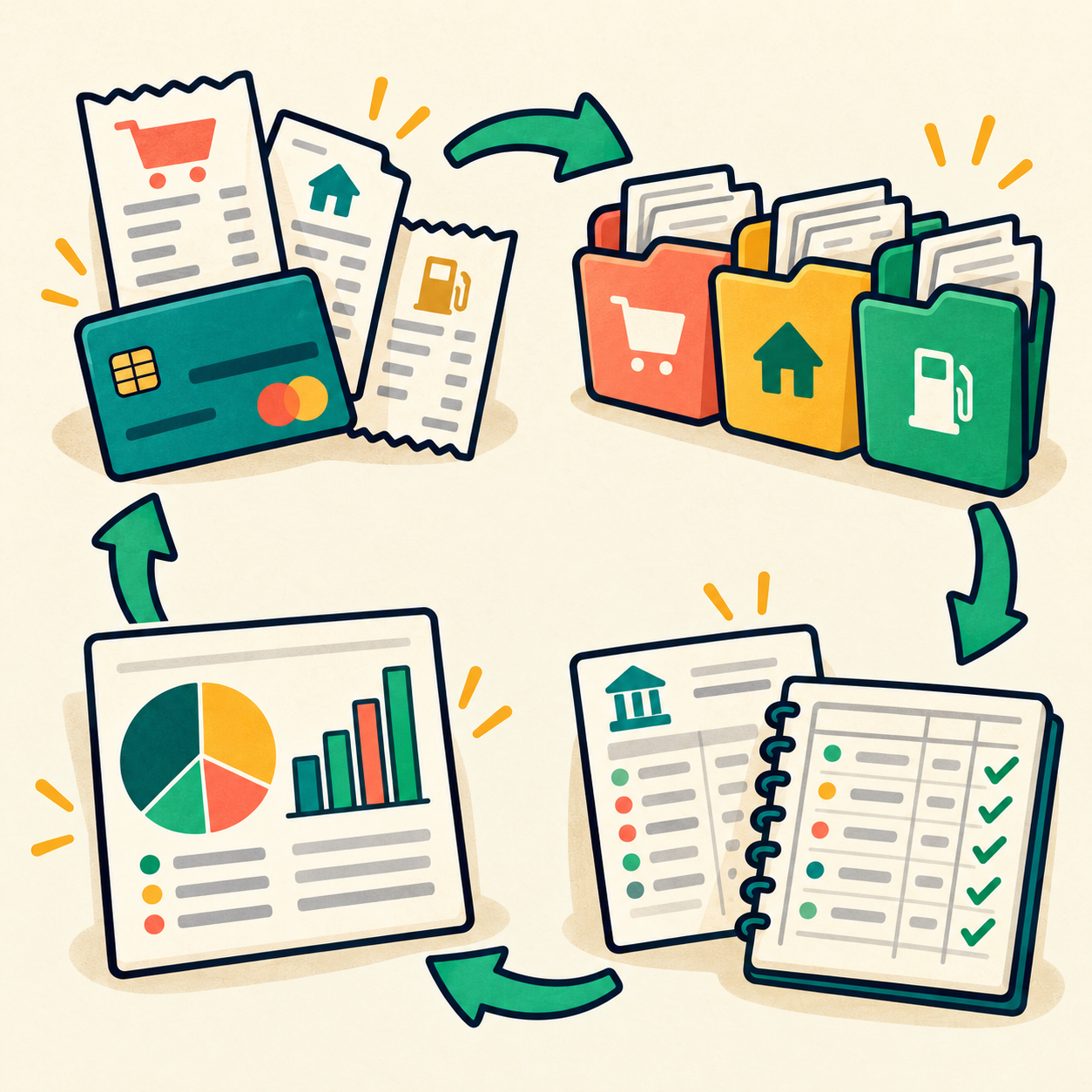
🔄 How It Works (Simple 4-Step Process)
- Client gets transactions (sales, expenses, bank transfers)
- You record them (categorize in accounting software)
- Reconcile monthly (match software to bank statements)
- Generate reports (P&L, balance sheet, tax prep)
🎯 KEY TAKEAWAY
Bookkeeping is one of the most underserved business needs. Small business owners hate doing it, can't afford full CPAs, but desperately need the help. This creates a huge market opportunity.
2. Why Online Bookkeeping Is a Great Side Hustle
Online bookkeeping is a strong side hustle because it combines recurring monthly income, remote-friendly work, and a service businesses continue needing long after the first setup.
💰 Monthly retainers can make the income more predictable
Unlike one-off freelance projects, bookkeeping usually repeats every month.
That recurring structure often comes from:
- Transaction categorization
- Account reconciliation
- Monthly reports
- Ongoing cleanup or support
- Regular communication with clients
This is one of the biggest reasons bookkeeping can become steady part-time income.
🧠 Businesses see the value quickly
Many owners do not enjoy tracking numbers, but they do care about having clean records and fewer surprises.
Good bookkeeping helps clients:
- Organize income and expenses
- Prepare for tax season
- Understand cash flow
- Reduce financial stress
- Make cleaner business decisions
That makes the service practical, useful, and easier to justify as an ongoing expense.
💻 The startup barrier is relatively low
Most beginners can start with a lean setup instead of needing a large investment.
A practical starter setup includes:
- Laptop
- Internet
- Bookkeeping software
- Secure document storage
- Professional email
Basic bookkeeping work often does not require a CPA license, but rules vary by location and by the services you offer.
🕒 It works well as flexible remote work
A lot of bookkeeping can be handled asynchronously, which makes it easier to fit around other responsibilities.
Common monthly workflow pieces include:
- Collecting client documents
- Reviewing transactions
- Reconciling accounts
- Preparing summaries
- Sending reports
That rhythm makes it especially appealing for organized part-time work from home.

📈 Strong systems can raise your effective hourly rate
Bookkeeping becomes more valuable when your process gets cleaner and faster.
The biggest efficiency levers often include:
- Monthly checklists
- Templates
- Software automations
- Better onboarding
- Niche-specific packages
As your systems improve, you can usually serve clients more efficiently without lowering quality.
🎯 It rewards structure more than constant creativity
This is a strong fit for people who prefer repeatable work over unpredictable creative output.
The role rewards:
- Accuracy
- Consistency
- Attention to detail
- Clear communication
- Organized records
That makes bookkeeping especially attractive for process-driven people who like bringing order to messy information.
🤝 Trust can turn clients into long-term relationships
Once business owners trust someone with their books, they often want to keep that support in place.
Client retention usually comes from:
- Accurate work
- Reliable deadlines
- Clean reports
- Fewer surprises
- Less owner stress
Long-term clients can reduce the constant pressure to keep finding brand-new work.
🧪 It can expand into more valuable financial support
Bookkeeping is often the starting point, not the ceiling.
Common expansion paths include:
- Cleanup projects
- Payroll coordination
- Tax prep support
- Reporting check-ins
- Higher-level financial services
That creates room to grow from a simple side hustle into a more specialized practice.
3. Services Online Bookkeepers Can Offer
Online bookkeeping becomes much easier to sell when you turn the work into clear, understandable services instead of simply promising to “help with the books.”
You do not need to offer every bookkeeping service when you start. A better beginner approach is to build a core monthly service, become comfortable delivering it accurately, and then add cleanup, reporting, administrative support, and specialized services as your skills improve.
Below are the main bookkeeping service categories you can build your business around.
📘 Core Monthly Bookkeeping
💳 Transaction Categorization
- 🧾 Typical Work: Reviewing transactions, categorizing income and expenses, handling uncategorized transactions and keeping financial records organized
- ⭐ Difficulty: ⭐⭐ Beginner-friendly | 🔁 Repeat Potential: Very high
- 🛠️ Main Skills: Bookkeeping fundamentals, chart-of-accounts knowledge and bookkeeping software
- 👥 Typical Clients: Freelancers, consultants, coaches, agencies and small businesses
- 🌟 Best for: Beginners learning the basic monthly bookkeeping workflow.
🏦 Account Reconciliation
- 🧾 Typical Work: Comparing bookkeeping records with bank and credit-card statements, identifying discrepancies and keeping account balances accurate
- ⭐ Difficulty: ⭐⭐⭐ Moderate | 🎯 Importance: Essential
- 🛠️ Main Skills: Reconciliation workflow, attention to detail and transaction research
- 👥 Typical Clients: Nearly any business receiving ongoing monthly bookkeeping
- 🌟 Best for: Bookkeepers ready to provide a complete recurring monthly service rather than transaction entry alone.
💡 PRO TIP
A reliable monthly foundation starts with accurate categorization and reconciliation—the recurring work most clients need before they can trust their reports.

🧹 Cleanup & Catch-Up Bookkeeping
🗂️ Catch-Up Bookkeeping
- 🧾 Typical Work: Entering and organizing historical transactions, reconciling previous months and bringing overdue books up to date
- ⭐ Difficulty: ⭐⭐⭐ Moderate | 💰 Project Potential: High
- 🛠️ Main Skills: Historical reconciliation, transaction categorization and organized problem-solving
- 👥 Typical Clients: Businesses several months behind on their bookkeeping
- 🌟 Best for: Bookkeepers who want project-based work that can lead naturally into monthly retainers.
🧽 Bookkeeping Cleanup
- 🧾 Typical Work: Reviewing duplicate transactions, correcting obvious categorization problems, addressing uncategorized items and cleaning up the chart of accounts
- ⭐ Difficulty: ⭐⭐⭐⭐ Moderate to advanced | 🔎 Research Required: Higher
- 🛠️ Main Skills: Troubleshooting, reconciliation and understanding how financial records fit together
- 👥 Typical Clients: Businesses whose books exist but have become disorganized or inconsistent
- 🌟 Best for: Bookkeepers with enough experience to recognize and correct common bookkeeping problems.
💡 PRO TIP
Cleanup work can create strong project revenue, but it requires patience, documentation, and enough experience to distinguish real errors from transactions that simply need clarification.

📊 Financial Reporting & Visibility
📈 Monthly Financial Reports
- 🧾 Typical Work: Preparing profit-and-loss reports, balance-sheet summaries and other agreed-upon bookkeeping reports from the client's records
- ⭐ Difficulty: ⭐⭐⭐ Moderate | 💼 Client Value: High
- 🛠️ Main Skills: Accurate bookkeeping, report generation and understanding standard financial statements
- 👥 Typical Clients: Business owners who want organized monthly financial information
- 🌟 Best for: Adding more visible value to a core monthly bookkeeping package.
📝 Plain-Language Monthly Summaries
- 🧾 Typical Work: Summarizing completed bookkeeping work, highlighting notable changes or missing information and preparing questions for the client
- ⭐ Difficulty: ⭐⭐⭐ Moderate | 🤝 Relationship Value: High
- 🛠️ Main Skills: Communication, organization and explaining bookkeeping information clearly
- 👥 Typical Clients: Owners who want more than a stack of reports at the end of each month
- 🌟 Best for: Bookkeepers who want their service to feel more personal and easier for clients to understand.
💡 PRO TIP
Reports become more valuable when clients can understand what changed, what is missing, and what deserves attention—not just receive a file of numbers.

💼 Business Support Services
💵 Accounts Receivable Support
- 🧾 Typical Work: Tracking customer invoices, reviewing outstanding balances and helping maintain organized receivable records
- ⭐ Difficulty: ⭐⭐⭐ Moderate | 🔁 Repeat Potential: High
- 🛠️ Main Skills: Invoice tracking, organization and client communication
- 👥 Typical Clients: Service businesses, agencies, consultants and businesses that invoice customers
- 🌟 Best for: Increasing the value of a monthly bookkeeping relationship with an adjacent support service.
🧾 Accounts Payable & Document Support
- 🧾 Typical Work: Organizing bills, tracking amounts owed, maintaining receipts and documents and keeping supporting financial records organized
- ⭐ Difficulty: ⭐⭐⭐ Moderate | 📂 Organization Required: High
- 🛠️ Main Skills: Document management, bill tracking and consistent recordkeeping
- 👥 Typical Clients: Growing small businesses with increasing numbers of vendors, bills and receipts
- 🌟 Best for: Detail-oriented bookkeepers who enjoy creating organized administrative systems.
💡 PRO TIP
Administrative support services fit naturally beside bookkeeping and can increase client value when the scope, document responsibilities, and approval process are clearly defined.

⚙️ Specialized Bookkeeping Support
👥 Payroll Coordination
- 🧾 Typical Work: Organizing payroll-related records, coordinating information with payroll systems or providers and recording appropriate bookkeeping information
- ⭐ Difficulty: ⭐⭐⭐⭐ Moderate to advanced | ⚠️ Complexity: Higher
- 🛠️ Main Skills: Payroll workflow knowledge, accuracy and familiarity with the client's payroll process
- 👥 Typical Clients: Small businesses beginning to hire employees or contractors
- 🌟 Best for: Bookkeepers who already have a reliable monthly workflow and want to add another recurring support service.
📁 Accountant & Tax-Prep Support
- 🧾 Typical Work: Organizing bookkeeping records, reconciling accounts, preparing reports and gathering requested documentation for the client's accountant or tax professional
- ⭐ Difficulty: ⭐⭐⭐ Moderate | 📅 Seasonality: Often higher around tax deadlines
- 🛠️ Main Skills: Clean recordkeeping, reconciliation, document organization and professional communication
- 👥 Typical Clients: Small businesses that want their books organized before working with their accountant or tax professional
- 🌟 Best for: Bookkeepers who want to become the bridge between everyday bookkeeping and the client's accounting or tax professional.
💡 PRO TIP
Specialized support can deepen client relationships, but stay within your qualifications and clearly distinguish bookkeeping support from tax preparation or professional accounting advice.

🎯 Niche Bookkeeping Services
🛒 E-Commerce Bookkeeping
- 🧾 Typical Work: Organizing sales, expenses, platform activity and other bookkeeping records associated with online stores
- ⭐ Difficulty: ⭐⭐⭐⭐ Moderate to advanced | 🧩 Specialization: High
- 🛠️ Main Skills: E-commerce workflows, transaction reconciliation and familiarity with the client's sales systems
- 👥 Typical Clients: Online stores and e-commerce sellers
- 🌟 Best for: Bookkeepers who want to specialize around a repeatable business model and client type.
💻 Freelancer & Service-Business Bookkeeping
- 🧾 Typical Work: Categorizing business income and expenses, reconciling accounts, organizing records and preparing basic monthly reports
- ⭐ Difficulty: ⭐⭐ Beginner-friendly | 🌱 Starter Potential: Very high
- 🛠️ Main Skills: Core bookkeeping fundamentals and straightforward monthly workflows
- 👥 Typical Clients: Freelancers, coaches, consultants, creators, agencies and small service businesses
- 🌟 Best for: Beginners looking for clients whose bookkeeping needs are often more straightforward.
💡 PRO TIP
Niche services make your marketing and workflow more specific, while freelancer and service-business books are often a practical starting point for building confidence.

🎯 Build Your Beginner Bookkeeping Package
🎯 KEY TAKEAWAY
Beginner's Best Bet: Start with transaction categorization, account reconciliation, basic monthly reports, and a short plain-language summary. Once that workflow is accurate and repeatable, add catch-up projects, cleanup work, or adjacent support services.
💡 PRO TIP
Present your bookkeeping offer as a clear system—monthly books, organized reports, and dependable communication—then add specialized services only when you can deliver them confidently and within your qualifications.
🚀 ACTION STEP
Write a focused first plan:
- Core workflow: Define categorization, reconciliation, reporting, and communication tasks.
- Client fit: Choose a business type and software you can handle competently.
- Boundaries: Separate bookkeeping from accounting, tax advice, and other regulated work.
- Delivery: Document access, deadlines, review checks, confidentiality, and pricing before onboarding.
4. How Much Can You Earn & Pricing Strategies
Bookkeeping income usually improves when you stop selling isolated tasks and start building a small roster of recurring monthly clients.
The strongest earnings often come from a mix of better-fit clients, cleaner systems, and pricing based on complexity instead of just hours worked.
🧠 Reality Check (What Actually Raises Income)
Bookkeepers usually earn more when they:
- Focus on monthly recurring clients
- Learn one or two software systems deeply
- Improve onboarding and monthly workflows
- Niche down into easier-to-price client types
- Charge based on complexity, not only time
The shift from “cheap help” to trusted recurring support is where the business gets stronger.
🎯 KEY TAKEAWAY
A manageable recurring roster and accurate, repeatable workflows matter more than a large number of poorly scoped clients.
🔑 Smart Pricing Progression
A practical path often looks like:
🧾 Starter Pricing & Cleanup Work
- Start with entry-level monthly pricing
- Charge separately for cleanup work
📦 Monthly Packages & Premium Support
- Move toward fixed monthly packages
- Add reporting, payroll, or niche-specific premium support
This creates more predictable revenue and a better client experience.
🎯 KEY TAKEAWAY
Price transaction volume, account count, reporting needs, and complexity—not just the number of clients. Cleanup and extra services need their own scope.
🧪 Real Example
📋 REAL-WORLD EXAMPLE
These scenarios illustrate gross client revenue, not verified typical results or take-home pay. They exclude software, support, overhead, and taxes. The hourly example uses a simplified four-week month; the larger rosters require enough delivery and review capacity.
🌱 Scenario A: Hourly beginner
- $25/hour
- 10 hours/week
- Around $1,000/month
🎯 Scenario B: Monthly retainer model
- $400/month per client
- 10 active clients
- Around $4,000/month
🚀 Scenario C: Niche specialist
- $800–$1,500/month per client
- 8–10 clients
- Around $6,400–$15,000+/month
The core skill set can stay similar while the business model becomes much stronger.
🎯 KEY TAKEAWAY
Use these scenarios to understand the model, not to predict your own income. Compare actual results and risks with your written plan.
🎯 What Actually Drives Income
🧮 Client Fit × Clear Scope × Reliable Systems = Income Potential
This is a business framework, not a mathematical earnings forecast.
- Client size: More transactions often mean higher pricing
- Complexity: Multiple accounts, payroll, or messy books increase value
- Industry niche: E-commerce and certain service businesses often justify premium rates
- Software skill: Cleaner QuickBooks or Xero workflows improve efficiency
- Retention: Long-term monthly clients stabilize cash flow
- Systems: Better onboarding, templates, and checklists raise effective hourly earnings
📈 Monthly Scope & Close Time (Pricing Reality)
📖 Read the Numbers in Context
A monthly fee must cover onboarding, document collection, transaction review, reconciliation, reporting, communication, and quality checks. Missing records and historical cleanup can overwhelm a low-priced package. Payroll, tax work, and advisory services require appropriate competence and authorization.
🎯 KEY TAKEAWAY
Look beyond headline income: assess the complete economics, risks, and real cash available.
🚀 Build Your First Recurring Bookkeeping Offer
Start with one suitable client type, one software workflow, clear monthly limits, and a separate cleanup quote. Use a four-week pilot to learn the real workload before building a larger client roster.
🧭 Run a Focused Bookkeeping Package Test
- Choose a client and competence boundary. Select a simple business type you understand and a bookkeeping platform you can use competently. Practice with sample data or arrange qualified review before handling real books if you are still learning. Do not offer regulated services or tax and legal advice outside your qualifications.
- Define the monthly package. State included accounts, transaction limits, reconciliation, reports, deadlines, client responsibilities, and revision or query handling. Identify exclusions such as payroll, tax filing, historical cleanup, and payment execution. Assess the records before quoting cleanup separately.
- Set up secure onboarding. Use named, least-privilege software access, multifactor authentication, and approved secure file sharing. Do not collect passwords in chat. Agree confidentiality, access removal, receipt deadlines, escalation rules, and who approves changes or payments; never execute bank payments without authorization.
- Test one small recurring engagement. Use a limited four-week pilot with clear written fees and scope. Log onboarding separately from monthly work. Follow a close checklist, investigate unreconciled differences, and obtain appropriate review rather than guessing or changing balances to force a match.
- Review effort before expanding. Track collected fees, close time, queries, missing documents, corrections, software costs, and client feedback. Compare actual workload with the package assumptions, adjust future pricing transparently, and add clients only when review quality and capacity are reliable.
🎯 KEY TAKEAWAY
A manageable recurring roster and accurate, repeatable workflows matter more than a large number of poorly scoped clients.
💡 Example: A Four-Week Bookkeeping Package Test
- Client: A small service business with straightforward records
- Offer: A monthly bookkeeping package with written account and transaction limits
- Setup: Secure named access and a documented onboarding checklist
- Cleanup: Historical corrections assessed and quoted separately
- Pilot: One four-week cycle with agreed document deadlines and report delivery
- Quality: Reconciliation checks and qualified review where needed
- Signals: Actual close time, unresolved items, corrections, collected fees, and renewal interest
This is a workload-learning plan, not a promise of clients or earnings. Use sample data if you are not ready for real client work. Client fees are gross revenue before software, review support, overhead, and taxes.
✍️ Write Your One-Line Earnings Test Plan
Use this structure to make the plan easy to review:
“For [client type], I will offer [monthly deliverables] within [account and transaction limits], at [agreed fee]. I will scope cleanup separately and review [close time, accuracy, costs, and renewal interest] after [pilot period].”
✅ Completed example
“For one small service business, I will pilot a clearly limited monthly bookkeeping package for four weeks, scope historical cleanup separately, and use secure access and a reconciliation checklist. I will review total close time, unresolved items, corrections, collected fees, and renewal interest before adding clients.”
🚀 ACTION STEP
Before starting:
Keep the first plan focused. Build a workable process before adding more complexity.

📋 Pricing & Revenue Planning Reference
Use these stage and pricing ranges as planning references, not verified typical earnings or a required timeline. Actual workload depends on transaction volume, account count, record quality, complexity, and service boundaries. Agency revenue is not the owner’s take-home pay.
💵 What Bookkeeping Services Can Earn
📊 Income Progression by Stage
🚀 Stage | Focus | 💰 Typical Monthly Income | ⏳ Timeline | 📌 What’s Changing |
Beginner | First small monthly clients | $500–$1,500 | 0–3 months | Learning systems, building confidence, charging starter rates |
Developing | Recurring monthly work | $1,500–$4,000 | 3–6 months | Better processes and referrals improve client quality |
Established | Stable client roster | $4,000–$8,000 | 6–12 months | Pricing, retention, and systems become more reliable |
Advanced | Niche specialist | $8,000–$15,000+ | 12–24 months | Premium retainers and specialized support increase revenue |
Professional | Firm or team model | $15,000+/month | 2+ years | Delegation, stronger processes, and packaged services create scale |
🎯 KEY TAKEAWAY
The stages describe possible progression, not guaranteed income or a required timeline. Use your own capital or business records to plan realistically.
📊 Key Metrics & Margin Snapshot
📈 Monthly Scope & Close Time (Pricing Reality)
📊 What Your Monthly Package Is Actually Worth
Metric | What to Record |
Collected client fees | Separate monthly work, cleanup, and add-ons |
Total client time | Include onboarding, close, queries, reporting, and review |
Scope usage | Record transactions, accounts, missing documents, and exceptions |
Quality and retention | Track corrections, unresolved items, feedback, and renewals |
Costs and capacity | Track software, review support, fees, and available close hours |
🎯 KEY TAKEAWAY
Recurring revenue is only useful if each package can be delivered accurately within sustainable capacity.
💸 Common Pricing Models
🧾 Common Pricing Models
Pricing Model | Typical Range | Best Use |
Hourly | $20–$75+/hour | Cleanup work, special projects, or irregular support |
Monthly fixed fee | $200–$1,000+ per client | Standard recurring bookkeeping for small businesses |
Project-based cleanup | $300–$5,000+ | Backlog work or messy books |
Premium bookkeeping package | $500–$2,500+/month | Reporting, support, and higher-complexity clients |
Add-on support | $100–$500+ extra | Payroll coordination, review calls, and extra workflow help |
🎯 KEY TAKEAWAY
Use complexity and actual workload to price packages. Keep cleanup, payroll, and other extra services explicit rather than silently absorbing them.
🧮 Check Your Project & Revenue Economics
Client contribution = collected fees − client-specific software, support, and payment costs.
Divide contribution by all client hours, including queries and review, to compare packages. Broader overhead, training, insurance where appropriate, and taxes still reduce what you keep. Onboarding effort is not automatically representative of a normal month.
🚀 ACTION STEP
🗓️ Build a Monthly Bookkeeping Revenue Snapshot
Use actual records and a sustainable plan—not projections alone—to decide what to continue.

5. Tools & Software You Actually Need
🛠 TOOLS & RESOURCES
💻 Essential Software
📒 QuickBooks Online (Industry Standard)
QuickBooks®: Official Site | Smart Tools. Better Business.
- Cost: $30–$180/month per client account (or you manage centrally)
- What it does: Records transactions, generates reports, integrates with banks
- Why essential: Most common platform; clients expect it; ProAdvisor certification available
- Learning curve: Medium (takes 2-3 weeks to be comfortable)
📘 Xero (Modern Alternative)
Accounting Software for Small Businesses
- Cost: $11–$82/month per client account
- What it does: Similar to QuickBooks; cleaner interface; slightly easier to learn
- Why it's good: Growing popularity; excellent reports; slightly cheaper
- Learning curve: Easy (more intuitive than QuickBooks)
🌊 Wave (Free Option)
Wave: Small Business Software - Wave Financial
- Cost: Free (clients pay for invoice add-ons if needed)
- What it does: Basic bookkeeping, invoicing, expense tracking
- Why useful: Great for learning; good for very small businesses
- Limitation: Limited advanced features
🧰 Supporting Software
🏦 Bank Integration & Reconciliation
- QuickBooks and Xero both integrate with most US banks
- Automatic transaction import saves enormous time
- Monthly reconciliation becomes 30-minute task vs. hours
⏱️ Time Tracking (For Hourly Billing)
- Toggl Track (free) - Time tracking for clients
- Clockify (free) - Simple time tracking
- Used if you bill hourly instead of retainer
💬 Client Communication
- Zoom (free) - Monthly check-in calls with clients
- Loom (free-$12/month) - Record tutorials showing client work
- Email (Gmail free) - Primary communication
📁 Document Organization
- Google Drive (free) - Organize client documents, invoices
- Dropbox (free tier or $12/month) - Secure file sharing with clients
🤝 Client Management & CRM
- Notion (free-$10/month) - Client database and tracking
- Dubsado ($25-$50/month) - Client portal and billing
- 17hats ($50-$300/month) - Full practice management
📊 Reporting & Analysis
- Google Sheets (free) - Custom analysis and dashboards
- Looker Studio (free) - Create visual financial dashboards
- Excel - Advanced financial modeling if comfortable with it
✅ Your Minimal Startup
Total to launch: $0–$50/month
- QuickBooks (you charge to clients, they pay for it)
- OR Xero (same)
- OR Wave (free to start learning)
- Gmail (free)
- Google Drive (free)
- Zoom (free version sufficient)
Realistic starter: Many bookkeepers start with Wave or free QuickBooks trial to learn, then upgrade when they have clients

6. Finding Your First Clients
Getting bookkeeping clients is mostly about trust + visibility. Start with direct outreach, build relationships in business communities, and use platforms to get your first reviews.
💼 LinkedIn Outreach
Best for: Professional outreach, high-intent business owners, niche targeting
- Connect with small business owners in your niche
- Message: “I help [business type] with bookkeeping so they can focus on growth.”
- Offer a free 15-minute consultation
- Build trust through helpful posts, comments, and direct conversations
- High-intent audience because users are already in a business mindset
Why it works: LinkedIn is one of the best places to reach business owners directly without needing paid ads.
📧 Cold Email Outreach
Best for: Direct prospecting, local businesses, niche businesses, service providers
- Find business owners through business directories
- Send personalized emails instead of generic templates
- Message example: “I noticed [business name]. I help businesses like yours with bookkeeping.”
- Include what you do, who you help, and a link to book a consultation
- Response rates vary; targeted, personalized emails usually outperform generic blasts
Pro Tip: Focus on businesses that look busy but may not have strong financial systems in place.
🤝 Local Networking
Best for: Local clients, referral relationships, trust-based sales
- Attend local business meetups and chamber of commerce events
- Join BNI groups
- Network with real estate investors, contractors, salon owners, and local service providers
- Build relationships first; referrals follow naturally
- Bring a simple business card or one-page service sheet
Why it works: Bookkeeping is trust-based. Meeting people in person can shorten the sales process.
💻 Freelance Marketplaces
💼 Upwork
Best for: First clients, reviews, remote bookkeeping jobs
- Create a profile emphasizing your bookkeeping specialization
- Bid on bookkeeping projects
- Competition is high, so your profile and portfolio need to be strong
- Good for getting your first few clients and reviews
📦 Taskrabbit Marketplace / Local Service Ads
Best for: Local service-based bookkeeping support
- Similar client acquisition model to Upwork and Fiverr
- Very local-focused
- Good for building reputation in your area
- Works best when paired with local networking
🟢 Fiverr

Best for: Packaged bookkeeping offers
- Create service packages, such as “Monthly bookkeeping for e-commerce businesses”
- Customers come to you through search
- Takes time to build initial reviews
- Can be lucrative once your profile gains traction
🗣️ Communities, Referrals & Partnerships
👥 Facebook Groups

Best for: Warm leads, small business communities, niche groups
- Join small business owner groups
- Help people with bookkeeping questions
- Mention that you offer services when relevant
- Often leads to direct inquiries
Referral Program
Best for: Low-cost client acquisition
- Offer a $100–$200 referral bonus for new clients
- Tell existing clients about the bonus
- Ask accountants, bookkeepers, and business coaches for referrals
- Word-of-mouth is one of the lowest-cost ways to grow
🏘️ Nextdoor

Best for: Local trust-building
- Post about your bookkeeping services
- Reach a highly local audience
- Build reputation through community visibility
- Great for local service businesses and solo business owners
Partnerships
Best for: Consistent referrals and long-term growth
- Connect with business coaches who need bookkeeping support for clients
- Partner with bookkeeping agencies that need overflow help
- Work with tax professionals who need bookkeeping cleanup before tax season
- Revenue-share models can work well
🎯 Niche-Specific Client Strategy
🛒 For E-Commerce Businesses
Best for: Shopify sellers, Amazon sellers, online store owners
- Join Shopify forums and e-commerce communities
- Advertise in e-commerce-specific Facebook groups
- Reach out to Amazon and Shopify seller communities
- Charge premium monthly rates: $600–$1,200/month
🎤 For Coaches & Creators
Best for: Online coaches, course creators, influencers, consultants
- Join coaching and creator communities
- Advertise in Slack groups and private communities
- Partner with coach training programs
- Reasonable monthly rates: $300–$600/month
📦 For Service Businesses
Best for: Contractors, cleaners, landscapers, consultants, local service providers
- Join local contractor and service provider groups
- Network at industry events
- Partner with business coaches who serve this market
- Standard monthly rates: $400–$700/month
7. From Discovery Call to Monthly Close
Landing a bookkeeping client is only the beginning. The real work is building a process that turns messy financial information into accurate, organized, repeatable monthly books without creating constant back-and-forth for you or the client.
Use the seven tabs in order for a first engagement, then return to the phase you need each month. Practice with sample books or arrange qualified review if you are not yet ready to handle real client records.
📞 PHASE 1 — Qualify and Define the Work
📋 Steps 1–5: Understand the business, assess fit, separate cleanup, and define a package you can actually deliver.
✅ Ready to move on: The client fits your competence and the recurring work, cleanup, limits, and exclusions are clearly identified.
📞 Step 1: Qualify the Client Before Saying Yes
Not every business is a good first bookkeeping client.
Before discussing price, understand what you would actually be taking responsibility for.
Ask about the business:
- What type of business do you operate?
- How long have you been in business?
- What bookkeeping software are you currently using?
- How many bank and credit-card accounts are involved?
- Approximately how many transactions occur each month?
- Do you have payroll?
- Do you invoice customers?
- Do you collect sales tax?
- Do you carry inventory?
- Do you have loans or financing accounts?
- When were the books last reconciled?
- Who currently handles the bookkeeping?
- Who prepares the business's taxes?
Then ask: “What made you look for bookkeeping help now?”
That question often reveals the real problem.
🚦 Step 2: Check Whether the Client Fits Your Skills
A client may be easier to start with when they have:
- A straightforward service business
- Separate business accounts
- Manageable transaction volume
- One primary bookkeeping platform
- Limited payroll or inventory complexity
- Cooperative communication
- Reasonably organized records
🔎 Evaluate More Complex Engagements
Additional evaluation may be needed when you see:
- Several months of unreconciled books
- Multiple bank or credit-card accounts
- Mixed personal and business transactions
- Missing documents
- Complicated payroll
- E-commerce integrations
- Significant accounts receivable or payable
- Multiple revenue streams
⚠️ Decline or Refer Work Outside Your Scope
⚠ COMMON MISTAKE
Be cautious when the engagement requires work outside your competence or professional scope.
Examples may include:
- Complex tax issues
- Legal interpretations
- Advanced accounting decisions
- Unfamiliar entity or industry requirements
- Serious unresolved historical discrepancies
- Situations where the client expects you to “make the numbers work”
A good bookkeeper does not accept every client. A good bookkeeper knows when the work needs someone with different expertise.
🔍 Step 3: Scope the Work Before You Quote It
Do not assume “monthly bookkeeping” means the same thing for every client.
Before agreeing to a package, identify the actual workload.
Review:
- Number of accounts
- Approximate monthly transaction volume
- Current reconciliation status
- Number of months behind
- Quality of existing records
- Payroll activity
- Invoicing activity
- Bills and accounts payable
- Loans
- Payment processors
- Sales platforms
- Reporting expectations
- Monthly communication needs
🧹 Step 4: Separate Historical Cleanup From Monthly Work
This is especially important:
🧹 Cleanup / Catch-Up
Historical work needed to bring the books to an agreed starting point.
🔁 Ongoing Monthly Bookkeeping
The repeatable work required after the books are current.
Do not silently include months of historical cleanup inside a normal monthly package.
Get the books to a known starting point first. Then the recurring workflow begins.
📋 Step 5: Define the Monthly Service in Writing
Once you understand the workload, turn it into a clear scope.
A basic monthly package might include:
- Transaction review and categorization
- Bank reconciliation
- Credit-card reconciliation
- Review of missing or unclear transactions
- Agreed monthly reports
- Short monthly summary
- One agreed communication method
- Agreed response and document deadlines
State included account and transaction limits, deliverables, fees, deadlines, and how extra work is approved. Confirm the workload before finalizing the quote.
🚫 State the Exclusions Clearly
Depending on your qualifications and package, exclusions might include:
- Historical cleanup
- Payroll processing
- Bill payment
- Tax return preparation
- Tax advice
- Sales-tax filing
- Financial planning
- CFO or advisory services
- Catch-up projects
- Additional entities
- Additional accounts beyond the agreed scope
If a client wants one of those services later, evaluate and scope it separately.
🚀 Your First 5 Actions
🚀 ACTION STEP
Start with one complete, supportable cycle—not a large roster.
- Practice: Complete a sample monthly close in the software you know; arrange qualified review if needed.
- Prepare discovery: Copy the business questions and client-fit checks into an intake form.
- Write the offer: Define included accounts, monthly work, exclusions, fees, and a separate cleanup assessment.
- Prepare onboarding: Set up secure named access, a client file, document requests, and authorization boundaries.
- Test the process: Rehearse discovery with a mock client or a suitable prospect, then agree a limited engagement only if you can deliver it accurately.
🔐 PHASE 2 — Agree Responsibilities and Protect Access
📋 Steps 6–11: Confirm the engagement and authorization boundaries, arrange secure access, and build a reusable client file.
✅ Ready to move on: The agreement is confirmed, access is appropriate, and document, reporting, communication, and billing responsibilities are recorded.
🤝 Step 6: Define the Client’s Responsibilities
The client has responsibilities in a successful bookkeeping relationship.
They may need to:
- Provide documents on time
- Respond to transaction questions
- Maintain separate business accounts
- Upload receipts
- Approve requested changes
- Notify you about new accounts or loans
- Provide payroll or sales information
- Review reports
- Maintain access to required systems
Bookkeeping becomes much harder when only one side of the relationship follows a process.
✍️ Step 7: Confirm the Agreement Before Accessing Anything
Before beginning work, confirm the relationship in writing.
Depending on how you operate, that may include:
- Proposal
- Engagement letter or service agreement
- Scope
- Fees
- Payment schedule
- Start date
- Client responsibilities
- Confidentiality expectations
- Cancellation terms
- Communication rules
- Authorization boundaries
🛂 Step 8: Confirm Who Can Approve Changes or Payments
For example:
You may:
Review, categorize, reconcile, and prepare agreed reports.
You may not automatically:
Transfer money, initiate payments, change banking permissions, make tax elections, or approve transactions on the client's behalf unless a properly authorized service specifically requires it.
Clarity here protects everyone.
🔐 Step 9: Set Up Named, Least-Privilege Access
Bookkeeping involves sensitive financial information.
Treat access as part of the professional service—not as an afterthought.
Use:
- Named user accounts
- Accountant or bookkeeper access when available
- Least-privilege permissions
- Multifactor authentication
- Secure document-sharing systems
- Strong unique passwords for your own accounts
- Approved client portals or platform access
Least privilege means only the permissions required for the agreed task; multifactor authentication adds another verification step at sign-in.
🔒 Avoid Password Sharing and Excess Permissions
🔒 QUICK NOTE
- Asking clients to text passwords
- Sharing one login between multiple people
- Storing credentials in ordinary notes
- Requesting more account permissions than you actually need
Whenever possible, have the client invite you through the software's official user-access system instead of giving you their credentials.
You need access to the records—not ownership of the client's accounts.
🧩 Step 10: Build the Client’s Business and Systems Profile
Create one organized location for the information you will need repeatedly.
Your Client File Might Include:
Business information:
- Business name
- Entity information provided by the client
- Main contact
- Accountant or tax professional contact when relevant
Bookkeeping systems:
- Accounting platform
- Bank and card accounts
- Payment processors
- Payroll platform
- Sales or invoicing platforms
🗓️ Step 11: Record Workflow Details and Service Terms
Workflow information:
- Monthly document deadline
- Reporting deadline
- Communication preference
- Recurring transaction notes
- Special categorization instructions
- Outstanding questions
Service information:
- Scope
- Start date
- Agreed accounts
- Add-ons
- Exclusions
- Billing terms
Do not depend on your memory.
Document the relationship.
Keep the file in the agreed secure location with access restricted to authorized people. Do not place credentials in routine client notes.
🧹 PHASE 3 — Reach a Supportable Starting Point
📋 Steps 12–14: Check the existing records, complete scoped historical work, and document or escalate unresolved discrepancies.
✅ Ready to move on: The starting position and cleanup status are supportable; unresolved items have owners and are not disguised as a completed close.
🔎 Step 12: Establish the Opening Position
Before beginning normal monthly bookkeeping, determine where the records actually stand.
Review:
- Last completed reconciliation
- Bank balances
- Credit-card balances
- Uncleared transactions
- Uncategorized transactions
- Duplicate entries
- Opening balances
- Old receivables or payables when applicable
- Existing chart of accounts
- Missing statements
- Prior reports
- Unusual balances
Reach a point where you can say:
“These are the books we are starting from.”
If historical records need significant correction, stop treating that as ordinary monthly work and scope the cleanup separately.
🧹 Step 13: Complete the Agreed Cleanup Before Monthly Work
Cleanup work may include:
- Reviewing historical transactions
- Correcting obvious duplicate entries
- Resolving uncategorized activity
- Reconciling previous periods
- Researching unexplained differences
- Cleaning obvious chart-of-accounts problems
- Documenting unresolved items
- Requesting missing records from the client
Work within the separately agreed cleanup scope. Keep a record of corrections and approvals, and involve the client’s accountant or another qualified reviewer for unfamiliar opening balances or accounting decisions.
🛑 Step 14: Investigate Unexplained Differences Without Forcing a Match
Never make an unexplained adjustment simply to force an account to reconcile.
If something does not match:
Investigate → Document → Ask → Escalate when necessary
Do not invent the answer.
A reconciliation that only “looks correct” is not the goal. The records need to be supportable.
📥 PHASE 4 — Gather Records and Resolve Transaction Questions
📋 Steps 15–18: Use a close calendar, collect complete records, review entries, and organize questions instead of interrupting the client repeatedly.
✅ Ready to move on: The required records and transaction questions are tracked, with unclear items flagged rather than guessed.
📅 Step 15: Build the Monthly Close Calendar
Once the books are current, establish a recurring monthly rhythm.
The exact dates will vary, but the sequence should remain consistent.
Timing | Primary Responsibility |
Days 1–5 | Client provides statements, receipts, notes, and missing information |
Days 5–10 | Review imports and categorize transactions |
Days 8–12 | Reconcile bank and credit-card accounts |
Days 10–14 | Resolve questions and investigate exceptions |
Days 13–16 | Complete quality-control review |
Days 15–18 | Prepare agreed reports and monthly summary |
Days 18–20 | Deliver reports and complete client follow-up |
The exact calendar matters less than establishing predictable deadlines.
The monthly close is the process of completing and checking a reporting period’s books. Treat the example dates as agreed working targets, not universal deadlines.
📥 Step 16: Collect the Required Monthly Records
Every client should have a documented close process.
Confirm that required information is available.
- Bank statements
- Credit-card statements
- Loan statements when relevant
- Sales information
- Payroll reports when included
- Receipts
- Invoices
- Client explanations
- Other agreed records
Request missing items through the agreed secure channel. Check the account, business, and statement period before using a file.
💳 Step 17: Review and Categorize Supported Transactions
Review imported and manually entered activity.
Check for:
- Uncategorized transactions
- Duplicates
- Personal transactions
- Transfers
- Unusual vendors
- Unclear deposits
- Large or unexpected transactions
- Missing documentation
Flag questions instead of guessing.
Use the chart of accounts—the client’s agreed category list—consistently. Match an import to an existing entry where appropriate instead of creating a duplicate. Confirm the receipt and business purpose before assigning a category; flag ambiguous items.
🔀 Check Transfers, Deposits, and Existing Entries
Before posting:
- Check whether a transaction is already represented by an invoice, bill, payment, or other entry.
- Check both sides of an account transfer; it is not automatically new income or expense.
- Distinguish sales receipts, loans, and owner contributions using supporting records.
- Follow documented treatment for personal activity and ask about exceptions rather than guessing.
- Keep an audit trail—a record of what changed, when, and why.
Do not make tax or accounting judgments outside your competence; escalate them.
❓ Step 18: Keep an Exception List and Batch Client Questions
Do not send the client a separate message every time you encounter a question.
Keep an organized exception list.
An exception is an item needing clarification or supporting evidence. Record the question, responsible person, and status; send questions together on the agreed schedule.
🧪 Example: A Monthly Exception List
📋 REAL-WORLD EXAMPLE
Transaction | Question | Status |
ABC Supply — $482 | Equipment, supplies, or personal? | Waiting |
Transfer — $2,000 | Which account received this? | Resolved |
Online charge — $89 | Business purpose? | Waiting |
Deposit — $1,250 | Customer payment or owner contribution? | Resolved |
Send questions together on an agreed schedule when practical.
This reduces interruptions for both you and the client.
Good bookkeeping creates fewer random messages—not more.
🏦 PHASE 5 — Reconcile and Verify the Monthly Books
📋 Steps 19–21: Match accounts to statements, review unusual balances, and perform a documented second-pass quality check.
✅ Ready to move on: Reconciliations and evidence are saved; questions and limitations are resolved or clearly flagged, with qualified review where needed.
🏦 Step 19: Reconcile Each Agreed Account to Its Statement
Reconcile each agreed account against its statement.
Confirm:
- Beginning balance
- Activity
- Ending balance
- Outstanding items
- Unexplained differences
If an account does not reconcile, investigate before continuing.
For each account:
- Select the correct account and statement period; confirm the statement ending date and balance.
- Compare the recorded transactions with the statement’s amounts and dates, identifying legitimate outstanding items.
- Review the difference and save the reconciliation report or evidence once the result is supportable.
A bank feed imports activity; it does not replace reconciliation against the statement.
🧭 Research Differences Before Completing Reconciliation
Check the correct account, statement dates, starting balance, duplicates, missing entries, and timing differences.
- Trace each discrepancy to a record or a clear explanation.
- Review outstanding items; do not mark them cleared just to make the balance agree.
- Ask the client for missing evidence and escalate unfamiliar corrections.
- Document the issue and approval for any correction.
Do not enter an unexplained adjustment or override a difference to force completion.
🔎 Step 20: Review the Books Before Generating Reports
Before generating reports, scan the records for obvious problems.
Look for:
- Negative balances that do not make sense
- Duplicate accounts
- Unexpected income or expense changes
- Old outstanding transactions
- Unusual uncategorized activity
- Large changes from the prior period
- Items requiring client clarification
The goal is not to make management decisions for the client.
The goal is to catch bookkeeping issues before reports are delivered.
✅ Step 21: Complete and Document the Quality-Control Review
Before telling the client the month is complete, perform a second-pass review.
Check:
Ask yourself: Could another qualified person understand what I did and why?
If not, improve the documentation.
If a material unresolved item prevents a reliable close, explain the limitation and agree the next action instead of claiming the month is complete.
📊 PHASE 6 — Report, Explain, and Close the Service Cycle
📋 Steps 22–25: Prepare the agreed reports, explain them factually, deliver securely, confirm billing, and set up next month.
✅ Ready to move on: The client received the package and understands open items; delivery, billing, and the next cycle’s expectations are documented.
📊 Step 22: Prepare the Agreed Monthly Report Package
Do not overwhelm the client with files they do not understand.
Deliver the reports included in the engagement and explain what matters in plain language.
A basic package may include:
- Profit and loss statement
- Balance sheet when applicable
- Other agreed reports
- Open bookkeeping questions
- Short monthly summary
Check the client, reporting period, and accounting basis (such as cash or accrual, which determines when income and expenses are recognized) before exporting. A profit and loss statement shows income and expenses; a balance sheet shows assets, liabilities, and equity at a date. Label draft or incomplete reports clearly rather than presenting them as final.
📝 Step 23: Write a Factual Monthly Summary
Books Completed Through: [Date]

Completed This Month:
- Bank accounts reconciled
- Credit cards reconciled
- Transactions reviewed
- Reports prepared

Items Requiring Attention:
- [Question]
- [Missing document]
- [Unresolved item]

Next Month:
- [Expected document or deadline]
- [Any known change]
Keep the bookkeeping summary factual.
Avoid drifting into tax, legal, investment, or financial advice outside your role.
💬 Step 24: Deliver Reports and Make Communication Predictable
The client should know:
- When documents are due
- When questions will be sent
- When books should be closed
- When reports will arrive
- How quickly normal messages are answered
- When meetings occur
- What counts as additional work
Send the package through the agreed secure channel to authorized recipients. Confirm receipt, identify open items and their next actions, and invite clarification of the factual bookkeeping summary.
🧪 Example: A Predictable Client Schedule
📋 REAL-WORLD EXAMPLE
Documents due: 5th Questions sent: By 10th Client responses due: 12th Monthly close: 15th Reports delivered: 17th Monthly call: Optional / package-dependent
Predictability makes the service feel professional.
🧾 Step 25: Confirm Billing and Prepare the Next Monthly Cycle
Follow the agreed payment schedule rather than assuming report delivery creates new payment terms.
- Issue or check the recurring invoice, separating monthly work, cleanup, and approved add-ons.
- Record collected fees and unpaid invoices separately; follow up as agreed.
- Save the delivered reports, reconciliation evidence, summary, and unresolved-item log securely.
- Confirm next month’s document deadline, expected account changes, and contact arrangements.
- Record completion or any limitations in the client’s close checklist.
Document later corrections and use appropriate approval or qualified review; do not silently change a previously delivered period.
🔄 PHASE 7 — Review Fit, Refine Scope, and Repeat
📋 Steps 26–29: Measure the real workload, document changes, decide which engagements remain suitable, and improve the close before growing.
✅ Ready to move on: You have reviewed the client’s health, agreed any scope changes, and chosen an improvement before accepting more work.
🧾 Step 26: Document and Agree Changes to Scope
Bookkeeping engagements tend to grow quietly.
A client may add:
- New bank accounts
- New credit cards
- Payroll
- Additional employees
- Another business entity
- More transactions
- New payment processors
- Accounts payable
- Invoicing
- E-commerce activity
Do not automatically absorb the additional work.
Use this process:
Identify → Measure → Discuss → Re-Scope → Agree
That does not automatically mean raising the price every time something changes.
It means making sure the service still matches the work being performed.
📈 Step 27: Track Client Health, Not Just Revenue
A client who pays a good monthly fee may still be a poor-fit engagement if the work constantly exceeds the expected scope.
Track:
Metric | Why It Matters |
Monthly Fee Collected | Shows actual recurring revenue |
Total Time | Reveals real workload |
Transaction Volume | Helps measure scope |
Number of Accounts | Shows complexity |
Missing Documents | Reveals workflow problems |
Client Questions | Shows communication load |
Corrections / Rework | Measures quality |
Close Date | Shows whether the workflow is staying on schedule |
Unresolved Items | Identifies risk and bottlenecks |
Client Responsiveness | Strongly affects efficiency |
Scope Changes | Shows when the package needs review |
🚦 Step 28: Decide Whether to Keep, Improve, Re-Scope, or Refer
After several monthly closes, evaluate the engagement. Choose a decision based on fit, quality, communication, and capacity—not revenue alone.
KEEP: The client fits your skills, communicates reasonably, provides records, respects the scope, and can be served accurately within your available capacity.
RE-SCOPE: The business has changed enough that the original agreement no longer matches the work.
Review the account count, transaction volume, services, deadlines, and responsibilities.
🛠️ Improve an Engagement Worth Keeping
The relationship is worth keeping, but something needs to change.
For example:
- Better document deadlines
- Cleaner intake
- Different communication rules
- Updated scope
- Different reporting process
- More automation
- Additional client training
🚪 Refer or Exit an Engagement That Cannot Work
The engagement may no longer be appropriate when:
- Work consistently exceeds your competence
- The client expects services you cannot provide
- Records cannot be adequately supported
- Required information is repeatedly withheld
- Security expectations are unacceptable
- The relationship cannot be made workable
Do not keep a bad engagement simply because it produces revenue.
🔒 Close Out an Engagement Securely When It Ends
If the client relationship ends, use an agreed handover process:
- Confirm the end date, final deliverables, billing, and unresolved items.
- Transfer reports and supporting records securely to the client or their authorized replacement.
- Arrange removal of your named access and any integrations no longer required.
- Retain or remove client files according to the agreed policy and applicable requirements.
Do not leave shared credentials or unnecessary access in place.
🧪 Step 29: Review One Full Client Cycle Before Adding Another
Instead of worrying about building a large roster immediately, use your first recurring client to perfect the workflow.
Discovery → Scope → Agreement → Secure Access → Cleanup → Monthly Close → Reports → Review
Afterward, ask:
- What took longer than expected?
- What information was missing?
- Which questions should have been asked during onboarding?
- Did the scope match the actual work?
- Did all accounts reconcile?
- Was my documentation clear?
- Did the client understand the reports?
- What can I template?
- What can I automate safely?
- What should I change before adding another client?
🎯 Set the Right Beginner Goal
Your goal should not be:
“Get as many bookkeeping clients as possible.”
It should be:
“Build a monthly close process I can execute accurately and repeatably.”
Use this cycle:
Qualify → Scope → Secure → Organize → Reconcile → Review → Report → Improve
🔄 Repeat a Reliable Process Before Growing
Once one client can move through that process smoothly, you have something you can repeat.
Then you can add another client.
Then another.
Eventually, the value of your bookkeeping practice comes not only from knowing how to categorize transactions.
It comes from having a system that keeps clients' books organized month after month.
Build the close process first. Then build the practice around it.
⭐ ADVANCED STRATEGY
As you learn, create reusable tools.
You may eventually have:
Keep the reusable templates in a secure, organized system; improve them from actual client cycles rather than building paperwork for its own sake.
📞 Prepare Before the Engagement
- Discovery questionnaire
- Client-fit checklist
- Scope template
- Proposal template
🔐 Standardize Onboarding
- Access checklist
- Document request list
- Client responsibilities sheet
- Cleanup assessment
📋 Reuse the Monthly Close Tools
- Monthly close checklist
- Exception log
- Reconciliation checklist
- Quality-control checklist
- Monthly summary template
📈 Review After the Close
- Client review notes
- Scope review
- Time and workload tracking
You are not just doing bookkeeping.
You are building a repeatable operating system.
⚠️ Keep Professional Boundaries Clear
📝 QUICK NOTE
Professional Boundary:Stay within your training, qualifications, and agreed service scope. Bookkeeping support is not automatically the same as tax preparation, legal advice, auditing, financial planning, or other professional services that may require additional expertise or authorization.
8. Scaling & Growing Your Practice
Use this section to turn a working bookkeeping practice into one that can grow: build repeatable systems, show credibility, communicate clearly, deliver clean monthly closes, delegate carefully, market with purpose, specialize strategically, and avoid the mistakes that cost bookkeepers income and energy. Chapter 7 gets you through a client's first close; this chapter helps you grow without losing accuracy.
⭐ ADVANCED STRATEGY
1️⃣ Build Strong Systems ⚙️
Efficiency = more income
Clients pay for accurate, on-time books. Systems let you deliver that every month without adding hours for every new client.
🛡️ Why Systems Come First
Growth multiplies whatever process you already have, good or bad.
Why this matters:
- A repeatable close makes quality consistent
- Faster onboarding frees time for sales
- Documented work can be handed off later
- Templates reduce small mistakes
- Automation handles routine work so you can review exceptions
☑️ Minimum Systems Checklist
- A written step-by-step monthly close process
- A client intake form and onboarding checklist
- Proposal and engagement templates
- Invoice and payment-reminder templates
- Monthly report and summary templates
- Bank feeds and recurring transactions set up
- A secure folder structure for every client
- A short video walkthrough for common client tasks
⚙️ How to Build Your Systems
📄 Option 1: Document Your Process
Write down what you already do so it can be repeated.
What to do:
- 📝 Create step-by-step process documents
- 🎥 Record video tutorials for clients
- 🔁 Update the steps after every close
- Keep everything in one searchable place
📋 Option 2: Build Reusable Templates
Start from a template instead of a blank page.
What to build:
- 📊 Monthly report templates
- 🧾 Client intake forms
- 📑 Proposal templates
- 💳 Invoice templates
🤖 Option 3: Automate Repetitive Work
Let software do the mechanical parts.
What to automate:
- 🏦 Bank feeds auto-reconcile many transactions
- 🔁 Recurring transactions auto-populate
- 📈 Reports auto-generate with formulas
- ⏱️ Reduce repetitive manual work
💡 PRO TIP
Automate the routine and review the exceptions. Never accept auto-matched or auto-categorized items without checking them.
🚀 Option 4: Make Onboarding Repeatable
A smooth first month decides whether the client renews.
What to do:
- Use one intake form and one onboarding checklist
- Request named, least-privilege software access
- Agree document deadlines at the start
- Send a welcome message that explains the monthly rhythm
- Record how long onboarding really takes
Avoid:
- Rebuilding the process for each client
- Collecting passwords in chat or email
2️⃣ Show Credibility & Proof 📁
Clients trust you with their financial records. Make it easy to see that you are accurate, organized, and reliable.
🗂️ What to Include in Your Proof Kit
Proof Piece | What It Shows |
Service menu and package descriptions | Exactly what is included, and what is not |
Sample monthly report (sample data) | What clients receive each month |
Anonymized case study | A messy-books-to-clean-books result, shared with permission |
Onboarding and close checklist | Your process is organized and repeatable |
Testimonials | Other clients were happy working with you |
Software certifications | Skill with platforms such as QuickBooks (ProAdvisor) or Xero |
Keep it tight:
- Lead with your best one or two case studies
- Group proof by client type or service
- Update it every few months
- Retire anything outdated
🛡️ Where to Show Your Proof
Place | Best For |
LinkedIn profile | Credibility with business owners and referral partners |
Personal site or one-page site | One home page for services, proof, and booking |
Upwork / Fiverr profile | Early reviews and a searchable service listing |
Proposal PDF | A tailored selection for one prospect |
Referral partner one-pager | Helping accountants and advisors recommend you |
Discovery-call follow-up email | Reinforcing trust right after you speak |
Display testimonials:
- Ask permission before quoting anyone
- Use a short line like “Clear reports and always on time.”
- Place one near your booking button
- Link to the full review where possible
🤝 Be Honest About Your Work
Do:
- Say what you do and do not do
- State the software you work in
- Separate bookkeeping from accounting and tax advice
- Use sample data or anonymized examples
Avoid:
- Sharing real client financial data
- Promising tax savings or specific results
- Offering regulated services outside your qualifications
🔒 Protect Client Confidentiality
Proof should never expose a client's numbers.
What to do:
- Get written permission before using any client story
- Remove names, account numbers, and identifying amounts
- Prefer percentages and plain descriptions of the work
- Keep confidentiality terms in every engagement
💡 PRO TIP
Label every proof piece with the service and client type. A prospect should recognize their own situation within seconds.
3️⃣ Communicate Like a Professional 💼
Clients judge your reliability from your first reply and your first close.
💬 Clear, Prompt Communication
Do:
- Reply to inquiries within a stated time, such as one business day
- Confirm scope and deadlines before starting
- Send a short monthly summary with every report
- Ask specific questions instead of vague ones
- Flag missing documents early
Avoid:
- Going silent while the close is in progress
- Over-promising a delivery date
- Starting with unclear or incomplete access
🔁 Handling Questions & Scope Requests
Do:
- Explain what is included each month
- Collect client questions in one message when possible
- Answer plainly and note what you changed
- Be polite and firm when a request is outside scope
- Quote extra work separately
Prevent scope creep by:
- Writing included services and limits down
- Setting document deadlines
- Keeping all agreements in writing
🟢 Show Your Availability Status
Status | Example Wording |
Open | “Taking new monthly clients” in your bio |
Limited | “2 client spots left this quarter” to set honest expectations |
Waitlist | “Waitlist open – next openings in [month]” |
⏱ List Turnaround Time Clearly
- Be realistic: “Books closed within [number] business days of receiving documents”
- Tell clients what delays the close
- Under-promise, over-deliver
- Quote cleanup timelines separately
📝 QUICK NOTE
Only say spots are limited when they really are. Honest scarcity builds trust; fake scarcity damages it.
4️⃣ Onboarding & Monthly Delivery Templates 📝
📝 Client Kickoff Template
Send this after the client agrees to the scope and before you request access:
Do not start work until scope, fees, and secure access are confirmed.
📝 Monthly Delivery Message Template
Use this when you send each month's reports:
Hi [Client Name],

Your [month] books are closed.

Attached:
• Profit & loss report
• Balance sheet summary
• [Optional: reconciliation summary]

Notes this month:
• [Key changes or unusual items]
• [Open questions or missing documents]

Next close: please send documents by [date].

Thank you,
[Your Name]
Send reports only after reconciliation and your quality check are complete.
📜 Engagement Terms Template
Keep your terms short, readable, and consistent every time:
Engagement Terms
• Services: [included work and limits].
• Exclusions: [cleanup, payroll, tax, advisory].
• Fees: [amount], billed [schedule].
• Client duties: [documents, deadlines, approvals].
• Access: [named, least-privilege access].
• Confidentiality: [how records are handled].
• Changes: [how extra work is quoted].
• Termination: [notice period and handoff].
☑️ What Your Terms Should Cover
- Included services and transaction or account limits
- What is excluded or quoted separately
- Fees and payment schedule
- Client document responsibilities and deadlines
- Access, security, and confidentiality
- Authorization boundaries, such as who approves payments
- Notice period and handoff if either side ends the work
💡 PRO TIP
Written terms every time, even for small clients, prevent most scope creep. Have a qualified professional review your template for your location.
5️⃣ Team & Delegation 👥
Delegate tasks, not accountability. Every close still carries your name.
🚦 When to Hire Help
- 📅 You're fully booked and turning down work
- ⏰ You're working 50+ hours/week consistently
- 🧩 You have clear, repeatable processes
- 🎓 You can train someone to handle some tasks
🚀 ACTION STEP
Document your close process first. If you cannot hand someone a checklist, you are not ready to delegate yet.
📤 What to Delegate vs. Keep
Delegate:
- 🧾 Data entry and transaction categorization
- 🏦 Monthly reconciliation
- 📊 Report generation
- 🤝 Client onboarding
Keep for yourself:
- 🧠 Complex issues and decisions
- 💬 Client strategy calls
- 📈 Scope, review, and client relationships
- 🚀 New business development
💵 Income Example With a Team
- 📌 You take a 20–30% markup on a team member's billable work
- ⏱️ Your management time reduces per-client workload
- 💡 Example: Hire someone at $20/hour to do $35/hour work = $15/hour margin before your review time, tools, and taxes
This is an illustration, not a forecast. Your real margin depends on review time, training, and rework.
🔒 Protect Your Clients When You Delegate
- Sign confidentiality terms before sharing any records
- Give named, least-privilege access, never shared logins
- Review all work before it reaches the client
- Remove access immediately when work ends
- Check local rules for contractors and employees
- Tell clients if others will work on their books, where required by your agreement
6️⃣ Growth Hooks & Referral Mastery 🎣
Good bookkeeping still needs a reason for the right clients to find you and say yes.
🪝 Hooks That Get Attention
Hook Type | Example |
Before / after | “Messy books to clean monthly reports: how a cleanup works” |
Checklist | “5 things to gather before tax season” |
Niche problem | “The bookkeeping mistakes online store owners make” |
Open spots | “2 monthly client spots open this quarter” |
Plain-language tip | “What your profit & loss report actually tells you” |
Client result | “How one client found out where their cash was going” |
🧠 Marketing Tactics That Work
📣 Share useful content regularly
- Short posts that explain one bookkeeping idea
- Seasonal reminders for clients and prospects
- Always protect client confidentiality
🤝 Ask for referrals on purpose
- Ask after a smooth close or a positive message
- Make it easy with a one-line referral message
- Thank every referral
🧾 Offer Cleanup as an Entry Point
- Scope and quote cleanup separately
- Use it to show your quality
- Offer an ongoing monthly package afterward
- Only accept projects you can complete well
🤝 Partner With Accountants & Advisors
- CPAs and tax professionals often need clean books from clients
- Share a one-page service overview
- Be clear where bookkeeping ends and tax work begins
📧 Build an Email List
- “Get notified when spots open”
- Send seasonal checklists and tips
- More reliable than social algorithms
🚀 ACTION STEP
Pick one hook from the table, publish one post this week, and include your availability status and a clear way to book a call.
7️⃣ Monthly Close Quality Checklist ✅
Accuracy is the product. A consistent check protects your reputation and reduces rework.
☑️ Monthly Close Checklist
Check | What to Verify |
Uncategorized items | Categorized, or flagged as open client questions |
Account reconciliation | Every account ties to its statement; differences investigated, never forced |
Duplicates and transfers | Duplicate entries removed and transfers handled correctly |
Invoices and bills | Receivable and payable balances match the records |
Payroll and other entries | Recorded from provider reports, within your qualifications |
Reports | Profit & loss and balance sheet reviewed for anything unusual |
Prior periods | No unexplained changes to closed periods |
Delivery | Right files, clear names, and notes on open items |
🔍 Pre-Delivery Review
Before sending, check:
- Scan reports for numbers that look out of line
- Compare against last month
- Confirm every promised report is attached
- Make sure open questions are written down
- Save a copy in the client folder
Common reasons clients request fixes:
- An item was categorized the wrong way
- A document was missed
- A report is missing or in the wrong format
- A question was never answered
- Something changed after a prior period was closed
🛠 TOOLS & RESOURCES
Keep this checklist in your task manager or Notion client database and run it before every delivery.
8️⃣ Specialization & Pricing Strategy 🎯
Clients usually hire the bookkeeper who understands their business, not the one who says yes to everything.
💎 Choose a Direction
Niche | Pricing Position | Why It Works |
🛒 E-commerce | Often higher complexity and pricing | Sales channels and fees need specialist handling |
👩🏫 Coaching / Services | Standard to slight premium | Simple records are easy to systemize |
🏘️ Real estate | Can support higher rates with the right workflow | Specialized tracking is valuable |
🤝 Non-profit | Mission-driven, relationship-based | Trust and clear reporting matter |
💰 Create Tiered Package Options
Menu example (adjust to your own pricing):

Essentials (categorization + reconciliation) .. [fee]/mo
Standard (+ reports + plain-language summary) . [fee]/mo
Premium (+ review call + niche reporting) ..... [fee]/mo

Add-ons:
Extra accounts ................................ +[amount]
Payroll coordination .......................... +[amount]
Cleanup / catch-up ............... quoted separately- Makes the decision easier for clients
- Builds an upsell path into every engagement
- Keeps cleanup and extras explicit
🧭 How to Specialize in 5 Steps
1️⃣ Start Generalist to Learn
Work with a mix of straightforward clients while you build your process.
2️⃣ Find Your Best Fit
After 10–15 clients, identify who is easiest and most profitable to serve.
3️⃣ Build Specialty Expertise
Learn niche-specific software and accounting methods.
4️⃣ Market to That Niche
Use niche language, examples, and proof in your marketing.
5️⃣ Charge Premium Rates
Price for the specialty, complexity, and reliability you now provide.
Generic Positioning | Specific Positioning |
“I do bookkeeping” | “Monthly bookkeeping for freelancers and consultants” |
“I help small businesses” | “Clean books for online store owners” |
“Bookkeeper” | “Bookkeeping and monthly reports for real estate investors” |
⭐ ADVANCED STRATEGY
Raise rates when your calendar fills, your systems are strong, or you are turning down work you would gladly take at a higher price.
9️⃣ Common Mistakes: Pricing, Scope & Clients ⚠️
The most expensive mistakes are often the ones that feel flexible and friendly.
❌ Pricing Too Low
The trap: “I'll charge less so people hire me.”
The reality: You attract difficult, demanding clients and create unsustainable income.
The fix: Price for complexity and workload. If no one hires you, improve your positioning or proof, not just your price.
❌ No Clear Scope
The trap: “I'll just help with whatever they need.”
The reality: Scope creep leads to undercompensation and burnout.
The fix: Write down what is included, what is excluded, and how extra work is quoted.
❌ Keeping Too Many Low-Value Clients
The trap: Counting every client as progress.
The reality: 10 clients at $300 can mean more work for less revenue than 4 clients at $800.
The fix: Track revenue per hour and replace the weakest-fit clients over time.
❌ Not Raising Rates
The trap: Keeping the same fee as your skills grow.
The reality: You stay underpaid while your experience and systems improve.
The fix: Review pricing on a schedule and give clients clear notice of changes.
⚠ COMMON MISTAKE
Low fees, vague scope, and wrong-fit clients all feed each other. Fix the scope and the price usually follows.
🔟 Common Mistakes: Systems, Compliance & Growth ⚠️
Protecting your time, your clients' data, and your reputation is part of running a professional practice.
❌ Not Specializing
The trap: Serving everyone the same way.
The reality: Generic bookkeepers compete on price; specialists command premium rates.
The fix: Use the five steps in Section 8 to choose a niche.
❌ Taking Every Client
The trap: Saying yes to work that does not fit.
The reality: Wrong-fit clients waste time and cause stress.
The fix: Use an intake questionnaire and decline poor-fit work politely.
❌ Poor Documentation
The trap: Keeping the process in your head.
The reality: You cannot scale or delegate without processes and systems.
The fix: Document each step and update it after every close.
❌ Ignoring Compliance
The trap: Treating client data as an afterthought.
The reality: Client data security and privacy are critical, and rules vary by location and service.
The fix: Use secure access, confidentiality terms, and stay within your qualifications.
❌ Giving Free Consultations Too Easily
The trap: Offering open-ended free calls to anyone.
The reality: You spend unpaid hours on poor-fit prospects.
The fix: Filter prospects with a detailed questionnaire or a paid consultation.
❌ Not Asking for Referrals
The trap: Waiting for referrals to happen on their own.
The reality: You miss one of the easiest growth sources.
The fix: Ask satisfied clients and partners on a regular schedule.
🚀 ACTION STEP
Save your kickoff message, delivery message, engagement terms, and close checklist as reusable templates this week, then use them with every client.
9. Learning, Templates & Resources
🛠 TOOLS & RESOURCES
Online Bookkeeping brings together accurate records, reconciliations, confidentiality, and disciplined monthly workflows. You do not need to master everything at once. Choose resources that help you complete the next practical step.
🎓 Learning (Free & Paid)
Start with one source that fits your current level. Practice what it teaches before collecting more courses or tools.
🎬 Bookkeeping Tutorials & YouTube
Watch worked bookkeeping examples to understand transaction handling and reconciliation before practicing in a demo ledger.
Watch BookkeepingMaster (YouTube Channel) for tutorials, examples, and practical ideas you can apply to online bookkeeping.
🟢 Beginner
Watch FinePoints Bookkeeping (YouTube Channel) for tutorials, examples, and practical ideas you can apply to online bookkeeping.
🟡 Intermediate
Watch Hector Garcia CPA (YouTube Channel) for tutorials, examples, and practical ideas you can apply to online bookkeeping.
🟡 Intermediate
Watch The Successful Bookkeeper (YouTube Channel) for tutorials, examples, and practical ideas you can apply to online bookkeeping.
🟡 Intermediate
🆓 Free Bookkeeping Learning
Learn accounting foundations, source documents, and reconciliations before accepting responsibility for client records.
Clara CFO provides financial education, tools, and practical guidance to help small-business owners understand their finances and make informed business decisions. Through educational resources and its Clara CFO Collective program, users can explore topics such as cash flow management, budgeting, financial statements, and business financial planning. How it helps with the Bookkeeping Side Hustle: This resource helps aspiring bookkeepers build foundational financial knowledge, understand the challenges small-business owners face, and develop stronger financial communication skills. It can supplement bookkeeping education by helping users better understand the financial information their future clients may need to organize and interpret. Clara CFO is a supplemental business financial education resource, not a substitute for professional bookkeeping training or certification.
🟢 Beginner

Use Intuit Academy to learn beginner concepts, examples, and workflows before starting online bookkeeping.
🟢 Beginner

Use Khan Academy — Accounting and Financial Statements to learn beginner concepts, examples, and workflows before starting online bookkeeping.
🟢 Beginner

Use AccountingCoach to learn beginner concepts, examples, and workflows before starting online bookkeeping.
🟢 Beginner
Use Coursera — Bookkeeping Basics to learn beginner concepts, examples, and workflows before starting online bookkeeping.
🟢 Beginner

Use AIPB Resources to learn beginner concepts, examples, and workflows before starting online bookkeeping.
🟡 Intermediate
💬 Bookkeeping Communities & Forums
Ask about workflows and learning questions without exposing client financial records or relying on peers for regulated advice.
Use Quickbooks Community to ask questions, study real examples, and network with people doing online bookkeeping.
🟢 Beginner

Use r/Bookkeeping to ask questions, study real examples, and network with people doing online bookkeeping.
🟢 Beginner
Use Xero Central to ask questions, study real examples, and network with people doing online bookkeeping.
🟡 Intermediate
Use r/Accounting to ask questions, study real examples, and network with people doing online bookkeeping.
🟡 Intermediate
💰 Paid Bookkeeping Courses
Compare structured bookkeeping and software training for assessed practice, recognized credentials where relevant, and appropriate scope.

Use Coursera — Bookkeeping Courses for structured training, courses, or credentials that build confidence in online bookkeeping.
🟢 Beginner

Use Skillshare — Bookkeeping Classes for structured training, courses, or credentials that build confidence in online bookkeeping.
🟢 Beginner

Use Udemy — Bookkeeping Courses for structured training, courses, or credentials that build confidence in online bookkeeping.
🟢 Beginner

Use LinkedIn Learning — Bookkeeping for structured training, courses, or credentials that build confidence in online bookkeeping.
🟡 Intermediate

Use Bookkeeper Launch for structured training, courses, or credentials that build confidence in online bookkeeping.
🔴 Advanced
📝 QUICK NOTE
Use secure client-approved systems and least-privilege access. These working records do not replace accounting software, professional standards, or qualified tax and legal guidance.
📝 What Should You Learn First?
Follow this order:
1️⃣ Bookkeeping foundations
Understand source documents, transaction categories, double-entry basics, and reconciliation.
2️⃣ One accounting platform
Practice in a demo environment before touching a live client ledger.
3️⃣ Scope & competence
Separate bookkeeping from tax, audit, and advisory work requiring other qualifications.
4️⃣ Client onboarding
Agree on responsibilities, access permissions, missing records, deadlines, and fees.
5️⃣ Monthly close
Practice matching records, resolving differences, and reviewing reports for anomalies.
6️⃣ Handoff & review
Communicate questions clearly and document the work completed and still outstanding.
🎯 KEY TAKEAWAY
Learn through a small, realistic practice task. Build confidence in the core workflow before adding more tools, paid courses, or commitments.
📄 Four Practical Starting Templates
Create these in a document, spreadsheet, or Notion page. They are working outlines—not ready-made legal agreements or professional advice. Use fictional data for practice and keep real records secure.
Client Onboarding Checklist
Record: Entity | Scope | Period | Authorized access | Records | Responsibilities
Confirm permissions and expectations without storing passwords.
Missing Records Log
Record: Date | Transaction | Missing evidence | Client question | Due date | Resolution
Avoid guessing classifications when information is incomplete.
Monthly Close Checklist
Record: Accounts | Reconciliations | Exceptions | Reports | Review | Delivery
Use to make recurring work consistent.
Client Query & Handoff Log
Record: Period | Issue | Evidence | Client decision | Open item | Next action
Keep an audit-friendly trail of questions and responses.
🚀 ACTION STEP
Choose one learning resource and draft your Client Onboarding Checklist. Use a small practice example to identify the next skill you need before taking on live work or spending more money.
🧰 Resources
Use these resources to put your online bookkeeping learning into practice. Start with a small, dependable setup and add a tool only when its purpose, cost, and limitations are clear.
💻 Bookkeeping Software
Practice transaction entry, categorization, and reconciliation in a demo environment. Choose software matched to the client’s accounting needs and your competence.

Use Wave to manage books, reconcile transactions, and serve bookkeeping clients with cleaner records.
🟢 Beginner

Use FreshBooks to manage books, reconcile transactions, and serve bookkeeping clients with cleaner records.
🟢 Beginner
Use QuickBooks Online to manage books, reconcile transactions, and serve bookkeeping clients with cleaner records.
🟢 Beginner

Use Zoho Books to manage books, reconcile transactions, and serve bookkeeping clients with cleaner records.
🟡 Intermediate
Use Xero to manage books, reconcile transactions, and serve bookkeeping clients with cleaner records.
🟡 Intermediate
📊 Financial Reporting & Analysis
Understand common reports and review unusual balances. Use reports to identify questions rather than make unsupported financial conclusions.
Use Google Sheets to track results, spot what is working, and improve performance for online bookkeeping.
🟢 Beginner

Use Looker Studio to track results, spot what is working, and improve performance for online bookkeeping.
🟡 Intermediate

Use Microsoft Excel to track results, spot what is working, and improve performance for online bookkeeping.
🟡 Intermediate
Use Fathom to track results, spot what is working, and improve performance for online bookkeeping.
🔴 Advanced

Use Syft Analytics to track results, spot what is working, and improve performance for online bookkeeping.
🔴 Advanced
⚙️ Practice Management & CRM
Organize recurring deadlines, requests, and client communications. Keep ownership and completion checks clear for each monthly task.
Use Google Drive to organize clients, files, schedules, communication, or repeatable workflows for online bookkeeping.
🟢 Beginner
Use Dropbox to organize clients, files, schedules, communication, or repeatable workflows for online bookkeeping.
🟢 Beginner
Use OneDrive to organize clients, files, schedules, communication, or repeatable workflows for online bookkeeping.
🟢 Beginner

Use Dext to organize clients, files, schedules, communication, or repeatable workflows for online bookkeeping.
🟡 Intermediate
Use Hubdoc to organize clients, files, schedules, communication, or repeatable workflows for online bookkeeping.
🟡 Intermediate
👥 Payroll & Compliance Tools
Explore payroll workflows and compliance support. Verify responsibilities and requirements before offering payroll services.

Use IRS Small Business Taxes to handle payments, invoices, income tracking, or taxes for your online bookkeeping work.
🟡 Intermediate
Use Gusto to handle payments, invoices, income tracking, or taxes for your online bookkeeping work.
🟡 Intermediate

Use ADP to handle payments, invoices, income tracking, or taxes for your online bookkeeping work.
🔴 Advanced

Use Avalara to handle payments, invoices, income tracking, or taxes for your online bookkeeping work.
🔴 Advanced

Use TaxJar to handle payments, invoices, income tracking, or taxes for your online bookkeeping work.
🔴 Advanced
💼 Bookkeeping Job Platforms
Find bookkeeping opportunities that match your training. Check the client’s scope and record quality before accepting work.
Use Fiverr to find paid opportunities, pitch services, or connect with clients for online bookkeeping.
🟢 Beginner

Use LinkedIn to find paid opportunities, pitch services, or connect with clients for online bookkeeping.
🟢 Beginner
Use Belay to find paid opportunities, pitch services, or connect with clients for online bookkeeping.
🟡 Intermediate

Use Freelancer to find paid opportunities, pitch services, or connect with clients for online bookkeeping.
🟡 Intermediate
Use Upwork to find paid opportunities, pitch services, or connect with clients for online bookkeeping.
🟡 Intermediate
📣 Marketing & Client Outreach
Explain your services and identify suitable small businesses. Be clear about what is bookkeeping and what requires another professional.
Use LinkedIn Business Page to promote your offer, capture leads, and build an audience around online bookkeeping.
🟢 Beginner

Use Canva / Canva Mockups to promote your offer, capture leads, and build an audience around online bookkeeping.
🟢 Beginner

Use Carrd to promote your offer, capture leads, and build an audience around online bookkeeping.
🟢 Beginner

Use WordPress.com to promote your offer, capture leads, and build an audience around online bookkeeping.
🟢 Beginner

Use Google Business Profile to promote your offer, capture leads, and build an audience around online bookkeeping.
🟡 Intermediate
🔒 Client Security & Data Management
Set up authorized access, secure storage, and retention practices. Protect client data and never keep shared passwords in a general tracker.
Use Google Forms to collect structured intake details, requests, and feedback through online forms for Online Bookkeeping.
🟢 Beginner
Use Fiverr to find paid opportunities, pitch services, or connect with clients for online bookkeeping.
🟢 Beginner
Use LinkedIn to find paid opportunities, pitch services, or connect with clients for online bookkeeping.
🟢 Beginner

Use Notion to organize project notes, documents, tasks, and reusable workflows in one workspace for Online Bookkeeping.
🟢 Beginner
Use Trello to organize assignments, checklists, and project stages on task boards for Online Bookkeeping.
🟢 Beginner
Use Belay to find paid opportunities, pitch services, or connect with clients for online bookkeeping.
🟡 Intermediate
Use Freelancer to find paid opportunities, pitch services, or connect with clients for online bookkeeping.
🟡 Intermediate
Use Upwork to find paid opportunities, pitch services, or connect with clients for online bookkeeping.
🟡 Intermediate
Use ClickUp to plan tasks, track project progress, and coordinate recurring work for Online Bookkeeping.
🔴 Advanced

Use Karbon to coordinate client communication, tasks, and accounting-practice workflows for Online Bookkeeping.
🔴 Advanced
10. Your First 6 Months Online Bookkeeping Plan
Your first 6 months in online bookkeeping should be focused on building bookkeeping knowledge, software confidence, trust, accuracy, and recurring client systems.
The goal is to move from:
Learn → Practice → Set Up Services → Find Clients → Monthly Reports → Repeat Work
By the end of 6 months, you should understand basic bookkeeping tasks, know which clients you can serve, have a simple service package, and be ready to manage books professionally for small businesses or freelancers.
🎯 6-Month Goal
By the end of your first 6 months, aim to have:
✅ Basic bookkeeping terms and workflows learned
✅ One bookkeeping software practiced
✅ A clear service offer for small businesses or freelancers
✅ A basic client intake form
✅ A monthly bookkeeping checklist
✅ 1–3 practice or paid clients completed
✅ A simple pricing structure
✅ A secure file and communication process
✅ A plan to grow with recurring monthly clients
🎯 KEY TAKEAWAY
Bookkeeping is valuable because business owners want clean records, organized numbers, and less financial confusion.
📅 Month 1: Learn Bookkeeping Basics
🎯 Main Goal
Understand the basic bookkeeping terms, tasks, and responsibilities before offering services.
✅ What to Do
- Learn basic bookkeeping vocabulary
- Understand income, expenses, assets, liabilities, and equity
- Learn how bank transactions are categorized
- Understand reconciliations
- Learn the difference between bookkeeping, accounting, payroll, and taxes
- Watch beginner bookkeeping tutorials
- Practice with sample business transactions
- Start a notes folder or bookkeeping checklist
🏁 Month 1 Success Looks Like
- You understand basic bookkeeping terms
- You know what bookkeepers usually do
- You understand what tasks require extra qualifications
- You have practiced categorizing transactions
- You are ready to learn bookkeeping software
⚠️ Beginner Mistake: Offering bookkeeping services before understanding the basics. Accuracy matters because business owners depend on clean records.
📖 Beginner Bookkeeping Terms
Term | What It Means |
Income | Money the business earns |
Expense | Money the business spends |
Chart of accounts | Categories used to organize transactions |
Reconciliation | Matching records to bank statements |
Accounts receivable | Money customers owe the business |
Accounts payable | Money the business owes others |
Profit and loss | Report showing income, expenses, and profit |
Balance sheet | Report showing assets, liabilities, and equity |

📅 Month 2: Learn Software & Practice With Sample Books
🎯 Main Goal
Get comfortable using bookkeeping software and practicing common client tasks.
✅ What to Do
- Choose one software platform to learn first
- Practice adding income and expense transactions
- Practice categorizing expenses
- Practice reconciling bank statements
- Learn how to create profit and loss reports
- Learn how to create balance sheet reports
- Practice cleaning up messy sample data
- Create a simple monthly bookkeeping checklist
🏁 Month 2 Success Looks Like
- You can navigate bookkeeping software
- You understand common monthly tasks
- You can create basic reports
- You have a checklist for practice work
- You feel more confident handling simple books
🎯 KEY TAKEAWAY
Bookkeeping software is only a tool. The real skill is knowing how to organize transactions correctly and review the numbers carefully.
🧰 Bookkeeping Software to Consider
Tool | Best For |
QuickBooks Online | Small business bookkeeping |
Xero | Small businesses and online businesses |
Wave | Freelancers and very small businesses |
FreshBooks | Service providers and invoicing |
Zoho Books | Small business accounting workflows |
Google Sheets | Simple trackers and practice |
Excel | Custom bookkeeping spreadsheets |
🏋️ Practice Tasks
Task | Why It Matters |
Categorize transactions | Keeps income and expenses organized |
Reconcile bank accounts | Confirms records match statements |
Review uncategorized items | Prevents messy books |
Create reports | Helps business owners understand performance |
Fix duplicate entries | Improves accuracy |
Track receipts | Supports clean records |
Organize monthly folders | Makes client work easier |

📅 Month 3: Build Your Service Offer & Client Materials
🎯 Main Goal
Turn your bookkeeping skill into a simple service that small business owners can understand.
✅ What to Do
- Choose your target client type
- Create one simple bookkeeping package
- Create a basic rate sheet
- Write a short service description
- Build a client intake form
- Create a monthly bookkeeping checklist
- Create a secure file-sharing process
- Decide what you will and will not include
🏁 Month 3 Success Looks Like
- You know who your bookkeeping service is for
- You have a simple package
- Your pricing is written down
- Your intake process is ready
- You can explain your service clearly
⚠️ Scale Smart: Be clear about scope. Bookkeeping is not the same as tax preparation, legal advice, or advanced accounting.
💡 Beginner Bookkeeping Client Types
Client Type | Why It Works |
Freelancers | Simple income and expense tracking |
Service businesses | Recurring monthly bookkeeping needs |
Online sellers | Sales, fees, expenses, and reports |
Coaches/consultants | Simple business records |
Local businesses | Ongoing monthly organization |
Real estate investors | Rental income and expense tracking |
Content creators | Income streams, expenses, and receipts |
📦 Starter Service Packages
Package | What It Includes |
Monthly Bookkeeping | Categorization, reconciliation, and reports |
Cleanup Package | Organizing past transactions |
Freelancer Books Setup | Simple income and expense system |
Receipt Organization | Monthly receipt and document cleanup |
Report Review | Profit and loss summary explanation |
Software Setup | Basic chart of accounts and workflow setup |

📅 Month 4: Find Your First Practice or Paid Clients
🎯 Main Goal
Start working with simple clients so you can gain experience, build trust, and improve your process.
✅ What to Do
- Tell your network you offer beginner bookkeeping help
- Reach out to freelancers, small businesses, or service providers
- Offer a limited starter package
- Create a simple profile on freelance platforms
- Join small business communities
- Ask potential clients what bookkeeping problems they have
- Complete one practice cleanup or monthly bookkeeping project
- Ask for feedback or a testimonial

🏁 Month 4 Success Looks Like
- You contacted potential clients
- You completed a practice or paid project
- You learned what clients struggle with
- You improved your intake questions
- You understand how long real client work takes
🎯 KEY TAKEAWAY
Early bookkeeping clients help you learn client communication, messy records, missing receipts, unclear categories, and monthly deadlines.
📍 Places to Find Bookkeeping Clients
Source | Best For |
Personal network | First trust-based clients |
Local businesses | Recurring monthly work |
Facebook groups | Small business owners and freelancers |
LinkedIn | Professional service clients |
Upwork | Beginner bookkeeping projects |
Fiverr | Productized bookkeeping packages |
Small business meetups | Local trust and referrals |
Freelancer communities | Simple bookkeeping needs |
📅 Month 5: Create a Monthly Bookkeeping Workflow
🎯 Main Goal
Build a repeatable process for handling bookkeeping work every month.
✅ What to Do
- Create a monthly client checklist
- Set deadlines for receiving documents
- Create a transaction review process
- Create a reconciliation checklist
- Create report delivery templates
- Track client questions and missing information
- Organize folders by client and month
- Follow up with clients after report delivery
🏁 Month 5 Success Looks Like
- Your monthly process is organized
- You can handle client work more confidently
- You are reducing errors
- Clients know what to send and when
- Your service feels more professional
🎯 KEY TAKEAWAY
Bookkeeping clients often stay long term when your process is consistent, accurate, and easy for them to follow.
🔄 Simple Monthly Bookkeeping Workflow
Step | What Happens |
Client sends documents | Bank statements, receipts, invoices, and reports |
Import transactions | Add or review bank feed data |
Categorize transactions | Assign income and expense categories |
Ask questions | Clarify unknown transactions |
Reconcile accounts | Match books to bank statements |
Review reports | Check for unusual numbers or errors |
Deliver summary | Send reports and notes to client |
Follow up | Confirm questions and next month’s needs |
🗓️ Simple Weekly Workflow
Day | Task |
Monday | Request documents and review client files |
Tuesday | Categorize transactions |
Wednesday | Reconcile accounts |
Thursday | Review reports and ask questions |
Friday | Deliver reports and summaries |
Weekend | Update checklists and improve templates |
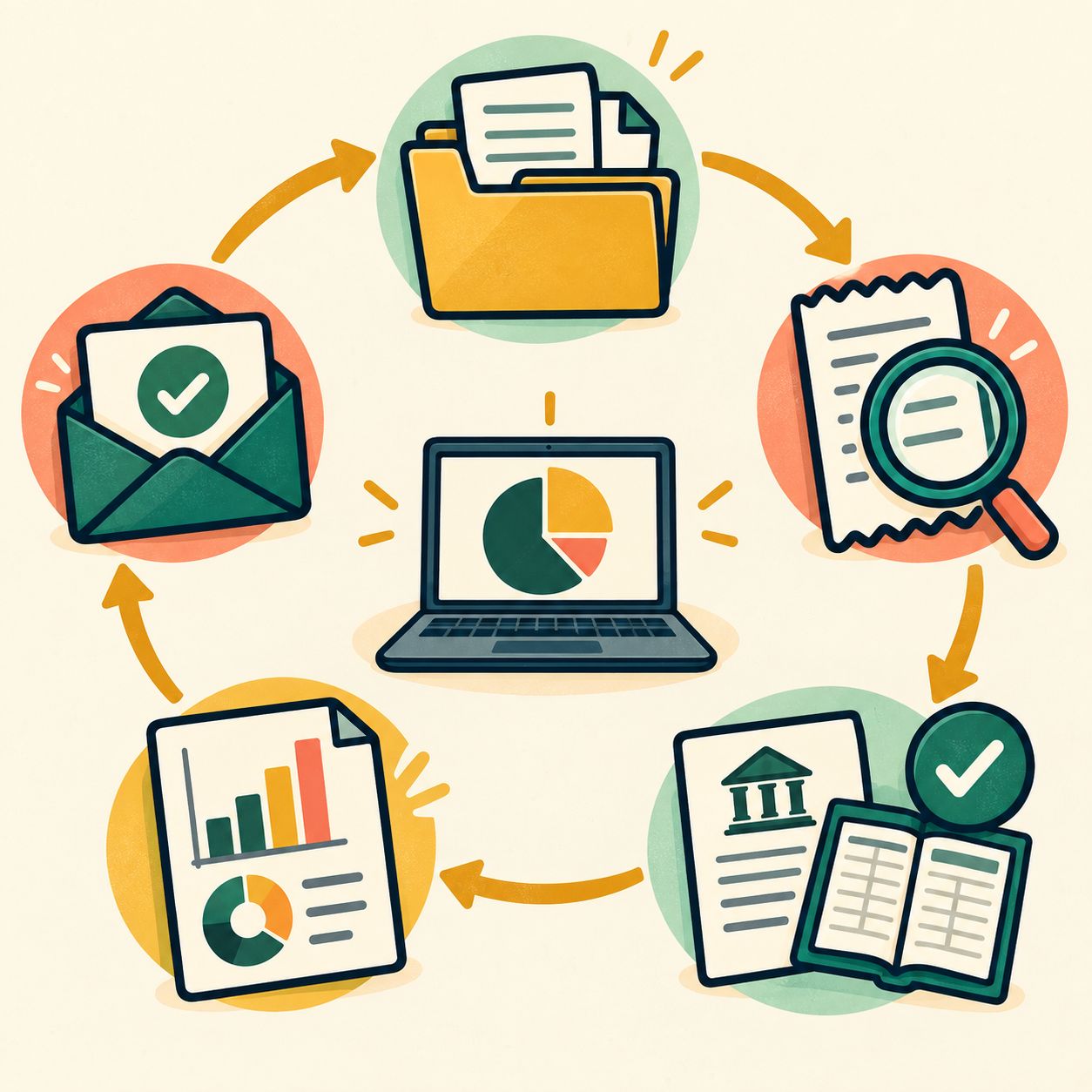
📅 Month 6: Review, Improve & Build Recurring Income
🎯 Main Goal
Review your first 6 months and decide how to grow with better systems, stronger pricing, and recurring clients.
✅ What to Do
- Review all practice and paid client work
- Identify which client type was easiest to serve
- Identify which services took the most time
- Update your pricing if needed
- Improve your checklist and intake form
- Create a recurring monthly package
- Ask satisfied clients for referrals
- Build a 90-day plan for months 7–9
❓ 6-Month Review Questions
- Which bookkeeping tasks were easiest?
- Which tasks took longer than expected?
- Which clients were easiest to communicate with?
- Which client type needs monthly help?
- Were your prices fair for the time involved?
- What questions did clients ask most often?
- What mistakes do you need to avoid next time?
- What software do you want to master next?
- Are you ready to take on recurring clients?
🏁 Month 6 Success Looks Like
- You know your best client type
- You have a repeatable bookkeeping workflow
- You understand your pricing better
- You have proof, testimonials, or feedback
- You have a 90-day plan to grow recurring income
🎯 KEY TAKEAWAY
Online bookkeeping becomes more stable when you move from one-time cleanup jobs to monthly recurring clients.
📊 Decision Table
If This Happens | Do This |
Freelancers are easiest to serve | Build freelancer bookkeeping packages |
Small businesses need monthly help | Offer recurring monthly bookkeeping |
Cleanup work takes too long | Charge separately for cleanup projects |
Clients send messy records | Improve intake and document rules |
You enjoy software setup | Offer bookkeeping setup packages |
Clients ask tax questions | Refer them to a tax professional |
You are getting referrals | Create a referral process |
Your work is underpriced | Raise rates for new clients |

✅ 6-Month Success Checklist
By the end of 6 months, check whether you have:
✅ Learned basic bookkeeping terms
✅ Practiced categorizing transactions
✅ Practiced reconciling accounts
✅ Learned one bookkeeping software
✅ Created a service package
✅ Created a rate sheet
✅ Created a client intake form
✅ Completed a practice or paid project
✅ Built a monthly bookkeeping checklist
✅ Created a secure document process
✅ Identified your best client type
✅ Created a plan for the next 90 days
⚠️ What Not to Do During the First 6 Months
Avoid these mistakes:
❌ Offering bookkeeping before learning the basics
❌ Mixing bookkeeping with tax advice if you are not qualified
❌ Taking clients with messy books without charging for cleanup
❌ Ignoring confidentiality and secure file sharing
❌ Guessing transaction categories without asking
❌ Skipping reconciliations
❌ Missing monthly deadlines
❌ Underpricing ongoing work
❌ Taking on complex clients too early
❌ Forgetting to document your process
⚠️ Reminder: Bookkeeping requires accuracy, confidentiality, and consistency. Clean records help business owners make better decisions.
🧭 Simple 6-Month Milestone Tracker
Month | Main Focus | Target Output |
Month 1 | Bookkeeping basics | Terms, concepts, and practice notes |
Month 2 | Software practice | Sample books and reports completed |
Month 3 | Service setup | Package, rate sheet, intake form |
Month 4 | First clients | 1–2 practice or paid projects |
Month 5 | Monthly workflow | Checklist, reports, delivery process |
Month 6 | Review & recurring income | 90-day growth plan created |
🚀 Final 6-Month Strategy
Your first 6 months should follow this simple path:
Month 1: Learn bookkeeping basics
Month 2: Practice with bookkeeping software
Month 3: Build your service offer
Month 4: Find your first practice or paid clients
Month 5: Create a monthly bookkeeping workflow
Month 6: Review results and build recurring income
The online bookkeepers who grow fastest are organized, accurate, reliable, and able to make business finances easier for clients to understand.

11. Get the Online Bookkeeping Starter Kit
🎁 Your Bookkeeping Client Toolkit
The Online Bookkeeping Starter Kit provides 12 browser-based client-service tools for onboarding, setting up books, reporting, reconciliation, proposals, pricing and workflow management.
The 12 components:
✅ 1. Client Intake Questionnaire — Gather necessary business, recordkeeping and service details.
✅ 2. QuickBooks Setup Checklist — Plan initial bookkeeping software configuration and verification.
✅ 3. Chart of Accounts Template — Design and review categories that fit a client's operations.
✅ 4. Monthly Report Template — Prepare draft summaries and review financial-report inputs.
✅ 5. Service Pricing Menu — Outline services and model package pricing.
✅ 6. Client Onboarding Checklist — Organize client handoff steps and access considerations.
✅ 7. Monthly Reconciliation Procedure — Work through transaction matching and discrepancy review.
✅ 8. Client Proposal Template — Draft scope, deliverables, timelines and fees.
✅ 9. Contract Template — Create draft service terms for independent legal review.
✅ 10. Tax Preparation Support Checklist — Organize records and handoffs for qualified tax professionals.
✅ 11. Software Comparison Chart — Evaluate bookkeeping tools and research their current terms.
✅ 12. Efficiency Tracker — Log time spent on client work and review workload trends.
Also included in the editable master: A central dashboard, Start Here guide, customer guidance and supporting field guides are present in the editable master.
The tools do not connect to live accounting platforms, import actual bank transactions, perform certified accounting or replace professional review. Double-check every client figure, privacy practice and legal requirement. Final release authorization is separate.

12. Frequently Asked Questions
🎓 Do I need an accounting degree?
No. You need accounting fundamentals and the ability to use bookkeeping software, which you can start learning with focused practice.
Many successful bookkeepers have no accounting degree.
💡 Certifications help, but they are not required.
📊 What's the difference between bookkeeping and accounting?
Bookkeeping is recording transactions.
Accounting interprets that data for things like tax planning, financial strategy, and business decisions.
You can do bookkeeping without being an accountant.
👉 If clients need accounting advice, refer them to a CPA.
💰 Can I really make $3,000–$5,000/month part-time?
Some bookkeepers reach that range, but it is not typical for a new part-time practice.
It usually depends on:
- ⏰ Hours you can actually close books each month
- 📅 How long it takes to find and keep clients
- 🔁 Consistent outreach in the early months
- 🤝 Whether clients stay and pay on time
💡 Recurring retainers can add up, but client count, rates, and workload still vary.
🧠 What if I don't know much about accounting?
Learn the fundamentals first.
Most bookkeeping is procedural:
- 🧾 Categorizing transactions
- 🔄 Reconciling accounts
- 📊 Generating reports
- 📁 Organizing financial records
💡 You don’t need advanced accounting knowledge. Software does much of the heavy lifting.
📍 How do I get my first clients?
Direct outreach to small business owners is usually the most effective.
Other options:
- 💼 Upwork
- 🧾 Fiverr
- 👥 Your personal network
- 📍 Local Facebook groups
- 🤝 Referrals from people you know
💡 Most successful bookkeepers’ first clients come from asking their network.
🎯 Should I specialize or be a generalist?
Start as a generalist to learn different client types.
Then specialize after 10–15 clients once you understand what you enjoy and what pays best.
Specialist niches include:
- 🛒 E-commerce bookkeeping
- 🏘️ Real estate bookkeeping
- 🎓 Coaches and creators
- 🍽️ Restaurant bookkeeping
- 🧰 Contractor bookkeeping
💡 Specialists can often charge more when they understand a niche well.
⏱️ What if a client wants more hours than my package includes?
Include a clause in your contract:
“Additional work billed at $X/hour.”
This sets the expectation that extra work costs extra.
👉 Clear scope prevents resentment and scope creep.
🔒 How do I handle client data security?
You’ll handle sensitive financial information, so security matters.
Best practices:
- 🔐 Never save client passwords in writing
- 🧰 Use a secure password manager like 1Password or LastPass
- 👤 Use QuickBooks/Xero user access instead of sharing passwords
- 🛡️ Consider cyber liability insurance
- 🤐 Keep client data confidential
💡 Trust is one of your biggest business assets.
🏢 Can I work with multiple clients in the same industry?
Yes, unless you have an exclusivity clause.
Many bookkeepers work with multiple clients in the same niche, such as:
- E-commerce businesses
- Coaches
- Consultants
- Contractors
- Real estate investors
💡 Working in one industry can actually create more referrals.
📈 How do I raise prices for existing clients?
Give 30–60 days notice.
Options:
- 📈 Gradual increase
- ⏳ Keep the old rate for 6 months, then increase
- 🔒 Lock in the old rate for annual payment
Use simple language:
“Due to increased experience, demand, and service improvements, my rates will be changing on [date].”
💡 Most good clients understand reasonable increases.
💻 What software should I recommend to clients?
Start with what you know best, usually QuickBooks or Xero.
Common options:
- 📊 QuickBooks: popular, widely used, strong integrations
- 📘 Xero: clean interface, good for small businesses
- 💸 Wave: free but more limited
💡 Recommend based on the client’s needs, budget, and integrations.
13. Important Considerations
Before you jump in, here are a few critical things to understand so you set yourself up for success and avoid common beginner mistakes.
💼 This Is a Responsibility-Driven Service
Bookkeeping isn’t just “data entry.”
You are handling real financial records that impact:
- 🧾 Taxes
- 📊 Business decisions
- ⚖️ Legal compliance
- 💰 Cash flow
- 📁 Financial organization
👉 Accuracy and attention to detail are non-negotiable.
⏳ It Takes Time to Build Consistent Income
This can become a recurring income stream, but most beginners build slowly.
Realistic path:
- 🌱 First 1–3 months: 0–2 clients
- 📈 Months 3–6: a few more if outreach and delivery hold up
- 🚀 Longer term: monthly totals depend on retainers, rates, hours, and retention
👉 This is not instant income — it’s a skill-based service business.
💰 Pricing Too Low Will Hurt You Long-Term
Many beginners undercharge to get clients quickly.
This can lead to:
- 😤 Difficult, high-demand clients
- 🔥 Burnout
- 📉 Low profit margins
- ⏳ Too much work for too little pay
Better approach:
- 🌱 Start slightly lower to gain experience
- 📈 Increase rates quickly as you gain confidence
- 📦 Create clear packages
📊 You Must Learn the Software, But It’s Fast
You don’t need a degree, but you do need to understand tools like:
- 📊 QuickBooks
- 📘 Xero
- 💸 Wave
💡 Many people get comfortable with the basics after a few weeks of focused practice.
🤝 Client Communication Matters as Much as Skill
Success isn’t just about bookkeeping.
It’s also about:
- 📊 Explaining reports clearly
- 📬 Being responsive
- 🤝 Building trust
- ⏰ Meeting deadlines
- 🧾 Setting clear expectations
💡 The best bookkeepers keep clients for years, not months.
📈 Specialization = Higher Income
General bookkeepers often compete on price.
Specialists can earn more because they understand industry-specific needs.
Examples:
- 🛒 E-commerce bookkeeping
- 🏘️ Real estate bookkeeping
- 🎓 Coaches and creators
- 🧰 Contractors
- 🍽️ Restaurants
👉 Specializing can support higher rates over time when you understand the niche.
🔒 Data Security Is Critical
You’ll handle sensitive financial data.
Best practices:
- 🔐 Never store passwords insecurely
- 👤 Use secure platforms and access controls
- 🤐 Keep client data confidential
- 🧰 Use password managers
- 🛡️ Consider cyber liability insurance
👉 Trust is your biggest asset.
🚫 Not Every Client Is a Good Client
Taking every client can lead to:
- 🐛 Scope creep
- 😫 Stress
- 📉 Lower income
- ⏳ Too much unpaid support
Learn to:
- 📄 Set clear boundaries
- 📦 Define your service scope
- 🚩 Spot bad-fit clients early
- ❌ Say no when needed
💡 Bottom Line
Online bookkeeping is a practical, in-demand service side hustle.
It rewards:
- 🔁 Consistency
- 💬 Professionalism
- ⚙️ Systems
- 🧠 Accuracy
- 🤝 Trust
👉 Treat it like a real business from day one, and recurring retainers can make income more predictable.
14. Your Next Steps
🚀 ACTION STEP
📅 This Week
- 💻 Choose QuickBooks, Xero, or Wave to learn
- 🎓 Complete free training for your chosen software
- 📺 Watch 5 YouTube videos on bookkeeping basics
- 💼 Create a LinkedIn profile emphasizing bookkeeping
🗓️ This Month
- ✅ Complete software training hands-on
- 🧪 Practice with sample accounts
- 📩 Reach out to 10 people asking if they need bookkeeping
- 👥 Post in local Facebook groups about your services
- 💬 Start conversations with people who might need bookkeeping help
🚀 Next 90 Days
- 🤝 Land and complete 1–3 first clients, even at a starter price
- ⭐ Collect testimonials from happy clients
- 📈 Add clients only when you can close books accurately
- 📦 Refine your service packages
- 🎯 Review close time, accuracy, and whether retainers are worth repeating
15. The Bottom Line
🎯 KEY TAKEAWAY
Online bookkeeping is a learnable service business with ongoing demand — a degree is not always required, but accuracy, confidentiality, and staying inside your qualifications are.
🙋 If you:
✔ Learn basic accounting and one platform in 4–6 weeks
✔ Communicate professionally and meet every deadline
✔ Specialize in a niche once you have experience
✔ Keep client data secure and confidential
🏗️ You can build:
💰 Recurring retainers can add up, but client count, rates, and hours still vary
🔁 Recurring monthly work instead of only one-off cleanup jobs
📈 Higher totals are possible with specialization and better-fit clients — not a set ladder
🚀 Small businesses often need this help. Start by learning the software and practicing with sample books.
16. Recommended Websites & Tools
🛠 TOOLS & RESOURCES
You do not need every resource listed below. This directory brings together the major platforms, tools, and resources from this guide, along with additional research and learning options, so you can find them in one place when you need them.
Start with the essentials. Add tools only when your bookkeeping practice develops a specific need for them.
💻 Bookkeeping & Accounting Software
- QuickBooks Online — Industry-standard bookkeeping software for recording transactions, reconciling accounts, generating reports, and serving small business clients.
- Xero — Cloud accounting platform for bookkeeping, bank feeds, invoicing, reports, and client financial organization.
- Wave — Free bookkeeping and invoicing option for learning the basics or supporting very small businesses.
💡 PRO TIP
Learn one platform deeply — usually QuickBooks or Xero — before adding others. Clients hire your accuracy in their software, not the size of your stack.
⏱️ Time Tracking & Hourly Billing Tools
- Toggl Track — Time-tracking tool for logging client work, tracking hourly projects, and measuring how long bookkeeping tasks take.
- Clockify — Free time tracker for hourly billing, productivity tracking, and client project time records.
💬 Client Communication & Walkthrough Tools
- Zoom — Video meeting platform for consultations, monthly check-ins, client onboarding, and report review calls.
- Loom — Screen recording tool for explaining bookkeeping updates, walking clients through reports, and creating async tutorials.
- Gmail — Email platform for client communication, document requests, follow-ups, and bookkeeping updates.
📁 Document Storage & File Sharing
- Google Drive — Cloud storage tool for organizing client documents, invoices, statements, reports, and bookkeeping folders.
- Dropbox — Secure file-sharing platform for storing and exchanging client documents, receipts, and financial files.
🤝 Client Management, CRM & Practice Systems
- Notion — Workspace for tracking bookkeeping clients, onboarding steps, recurring tasks, deadlines, notes, and service packages.
- Dubsado — Client management platform for proposals, contracts, invoices, workflows, and client portals.
- 17hats — Practice management tool for client workflows, bookkeeping business operations, billing, and administrative systems.
📊 Reporting, Dashboards & Analysis
- Google Sheets — Spreadsheet tool for bookkeeping trackers, custom reports, financial analysis, dashboards, and client summaries.
- Looker Studio — Google reporting tool formerly called Data Studio, useful for creating visual dashboards and financial reporting views.
- Microsoft Excel — Spreadsheet software for financial modeling, cleanup work, reports, reconciliations, and advanced bookkeeping analysis.
📍 Client-Finding, Networking & Marketplace Platforms
- LinkedIn — Professional networking platform for connecting with business owners, posting bookkeeping content, and finding direct clients.
- BNI — Business networking organization mentioned for local referral-building and trust-based client relationships.
- Upwork — Freelance marketplace for finding remote bookkeeping projects, first clients, and review-building opportunities.
- Fiverr — Freelance marketplace for packaged bookkeeping offers, monthly services, cleanup projects, and niche bookkeeping gigs.
- Facebook Groups — Community discovery page for joining small business groups, answering bookkeeping questions, and finding warm leads.
- Nextdoor — Local community platform for building visibility with nearby small businesses and solo business owners.
- TaskRabbit — Local services marketplace mentioned as a potential local client-acquisition channel.
📝 QUICK NOTE
Direct outreach to small business owners usually beats marketplaces for recurring clients. Platforms are for your first few wins.
🔒 Password & Security Tools
- 1Password — Password manager for securely handling client-related logins, access notes, and sensitive account credentials.
- LastPass — Password manager for storing and sharing access securely instead of keeping passwords in unsafe notes or messages.
📝 QUICK NOTE
Never store client passwords in writing. Use a password manager and platform user access from day one.
🛒 Platforms Mentioned for E-Commerce & Creator Bookkeeping Niches
- Etsy — Marketplace mentioned as an example of creator or e-commerce income that bookkeepers may need to reconcile.
- Patreon — Creator membership platform mentioned as an example of platform income that may need bookkeeping support.
🎯 KEY TAKEAWAY
You do not need every tool on this page. One accounting platform, one way to find clients, and secure file sharing are enough to land your first client.
🧭 How to Use This Directory
🧰 Start With a Simple Setup
Do not start by creating accounts with every service listed above. For most beginners, a simple setup is enough:
- One accounting platform
- One way to find clients
- Secure file sharing
- One time-tracking tool
That is enough to start building. Add tools only when you can name the specific problem they will solve.
🎯 KEY TAKEAWAY
Tools support the business. They are not the business.
Your biggest advantages will come from:
Accuracy → Meeting deadlines → Clear communication → Client retention
17. Explore Similar Side Hustles
 Consulting: Get Paid for What You Know — Upsell your best bookkeeping clients into higher-priced financial-organization advice.
- Virtual Assistance — Offer bookkeeping as a premium add-on to a broader admin support service.
 Remote Customer Service Jobs — Steady remote income while you build your bookkeeping client base.
 Transcription Jobs — Detail-oriented remote work you can do alongside client work.
- Resume Writing & LinkedIn Optimization — Help other professionals present their skills while you grow your practice.
 Investing & Dividend Income: Grow Your Wealth with Smart Investments — Put your recurring bookkeeping profits to work for long-term wealth.
Ready to start an online bookkeeping practice? View the starter kit above and learn your first bookkeeping software when you can practice with sample data.